Teamcentric Forge
Closed betaControlled AI access to your production machines.
Forge agents give AI assistants read-only checks on your production machines over MCP, and nothing more. Every request needs a key limited to one link and the kinds of checks it was given, the machine itself has the last word, and every call is recorded. Agents connect out, so no inbound port is ever opened — and the same checks keep your technical documentation true.
Teamcentric Forge is in closed beta. It runs on your own premises, in your private cloud, or hosted by Teamcentric for small teams, and access starts with a demo. Agents run on Linux today; Windows agents are in testing and available soon.
The problem
A shell, or nothing
Teams want to ask an AI assistant about the machines they run. The usual ways in give it far too much — and the facts it needs live on the machines that are hardest to reach.
- AI assistants get too much, or nothing
- Teams want to ask an assistant which server is running out of disk, or which release is live. The usual answers are a shell that can do anything, or a home-made script with no permissions and no record of what it ran.
- Production is hard to reach
- Servers in a data centre rack, build machines in the office, devices at a warehouse gate, file servers behind a NAT. Reaching one means a firewall port, a VPN for every person and site, or a jump host to keep patched.
- Documents go stale the day they are written
- Runbooks name the wrong release, architecture pages show last year's disk sizes, and release evidence is copied by hand from five consoles. Nobody trusts the numbers, so people check the systems themselves and the document stops being read.
How it works
Everything reached outbound
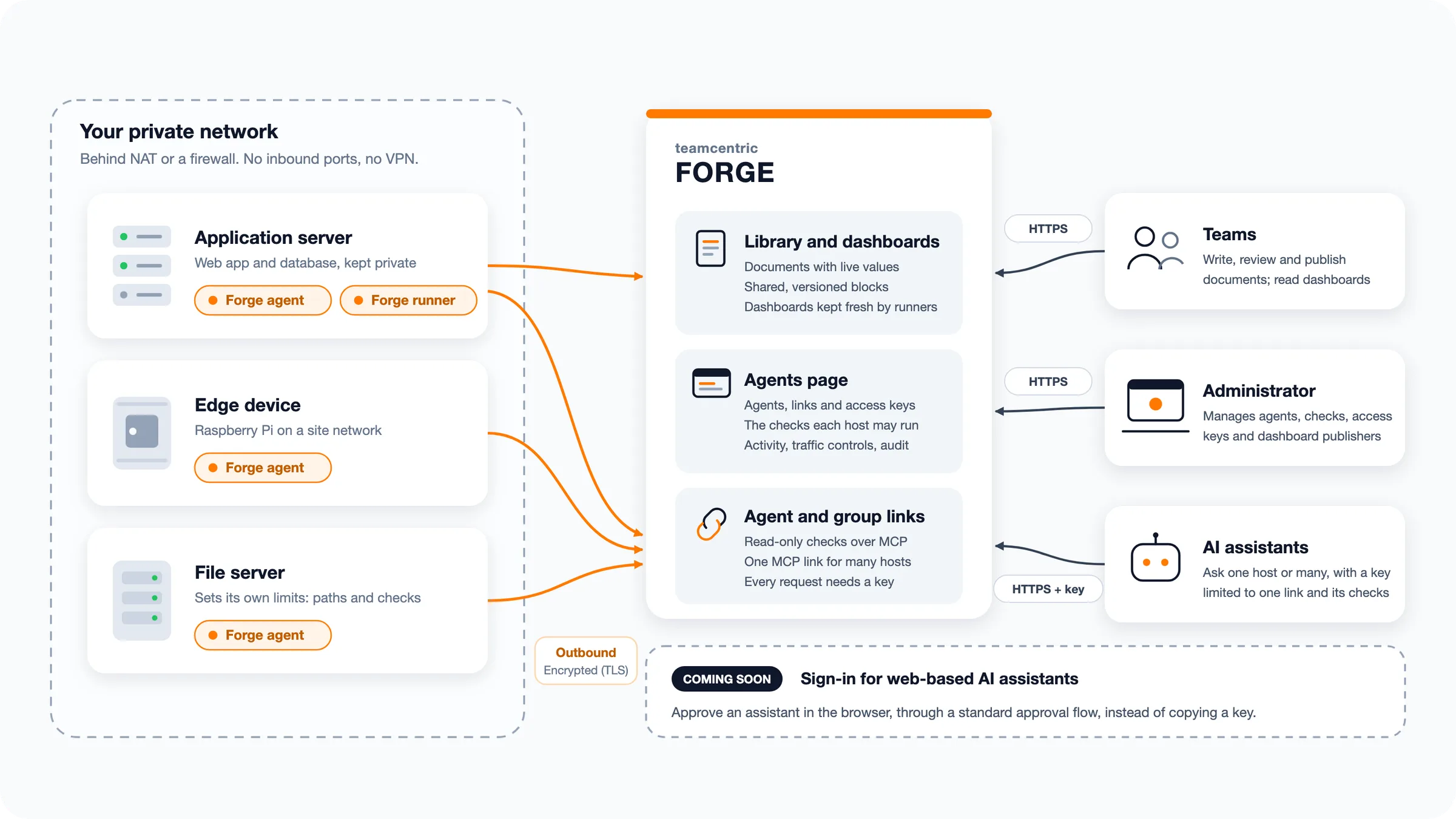
Agents and runners connect out to Forge over HTTPS, so production machines keep their networks closed. AI assistants reach them through a link and a key; documents are built where the data lives.
-
Connect the machines
A Forge agent on each machine connects out to Forge and shows as online, with the name and location the machine gives itself. Admins choose the checks it may run; the machine can refuse more.
-
Give each assistant a key
Create an access key for each person or tool, with only the permission classes they need, and point the assistant at an agent's or a group's link. Revoke a key or switch a link off whenever access should stop.
-
Write and publish documents
Authors write in the composer, insert an executable block for each fact the document states, and publish it to the Document Library as a version.
-
Build where the data lives
The Forge CLI builds the document on a machine that can reach the systems, with credentials that never leave it, and reports only how the build went. A runner keeps a dashboard fresh on its own schedule.
Forge agents
Private machines, reached without opening a port
A small Forge agent connects out to Forge, so the machine's network stays closed. One self-contained binary for Linux on amd64, arm64 and armhf — nothing else to install.
Windows agents are in testing Forge agents for Windows are being tested now and will be available soon, with the same read-only checks, keys and limits.
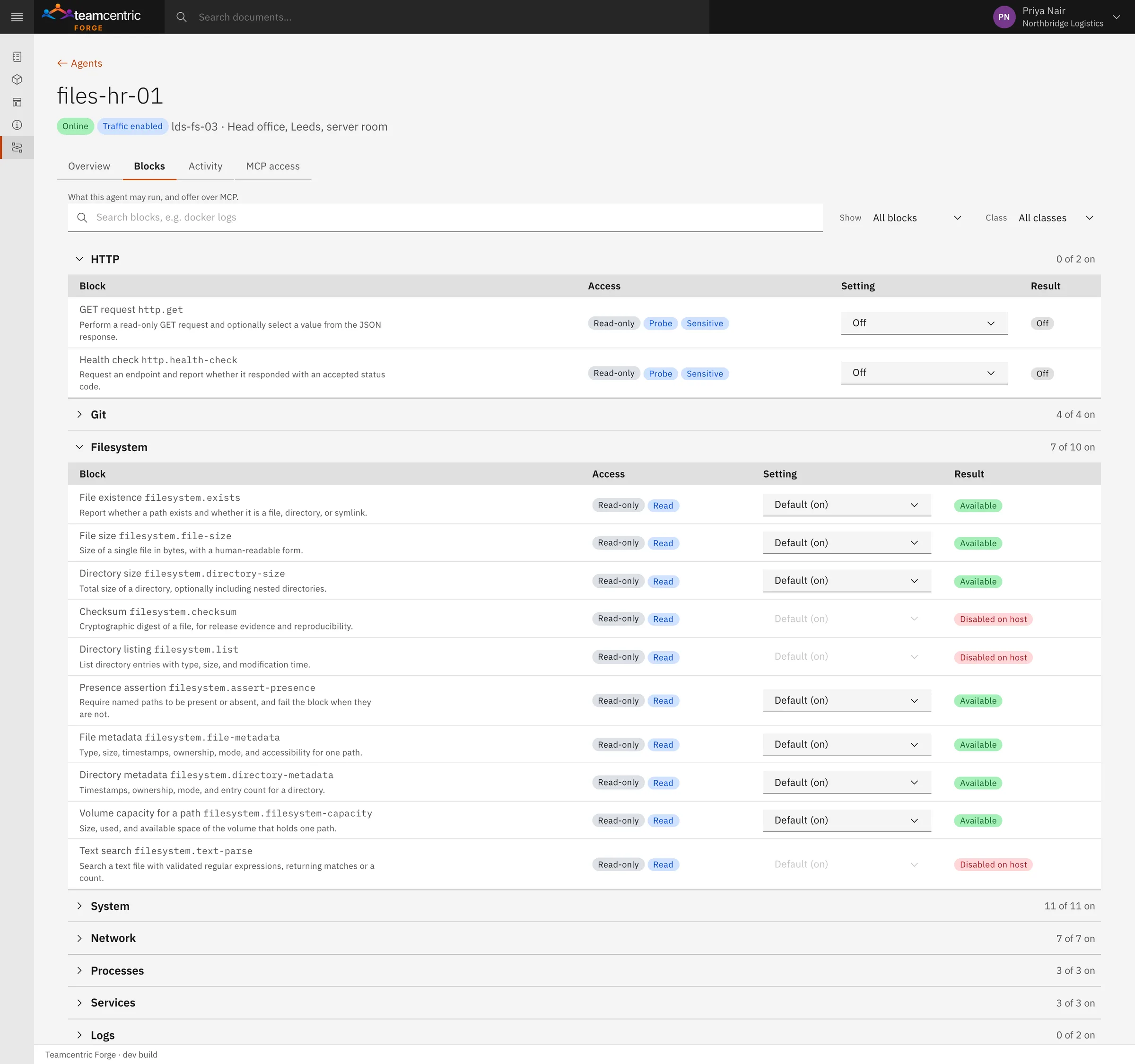
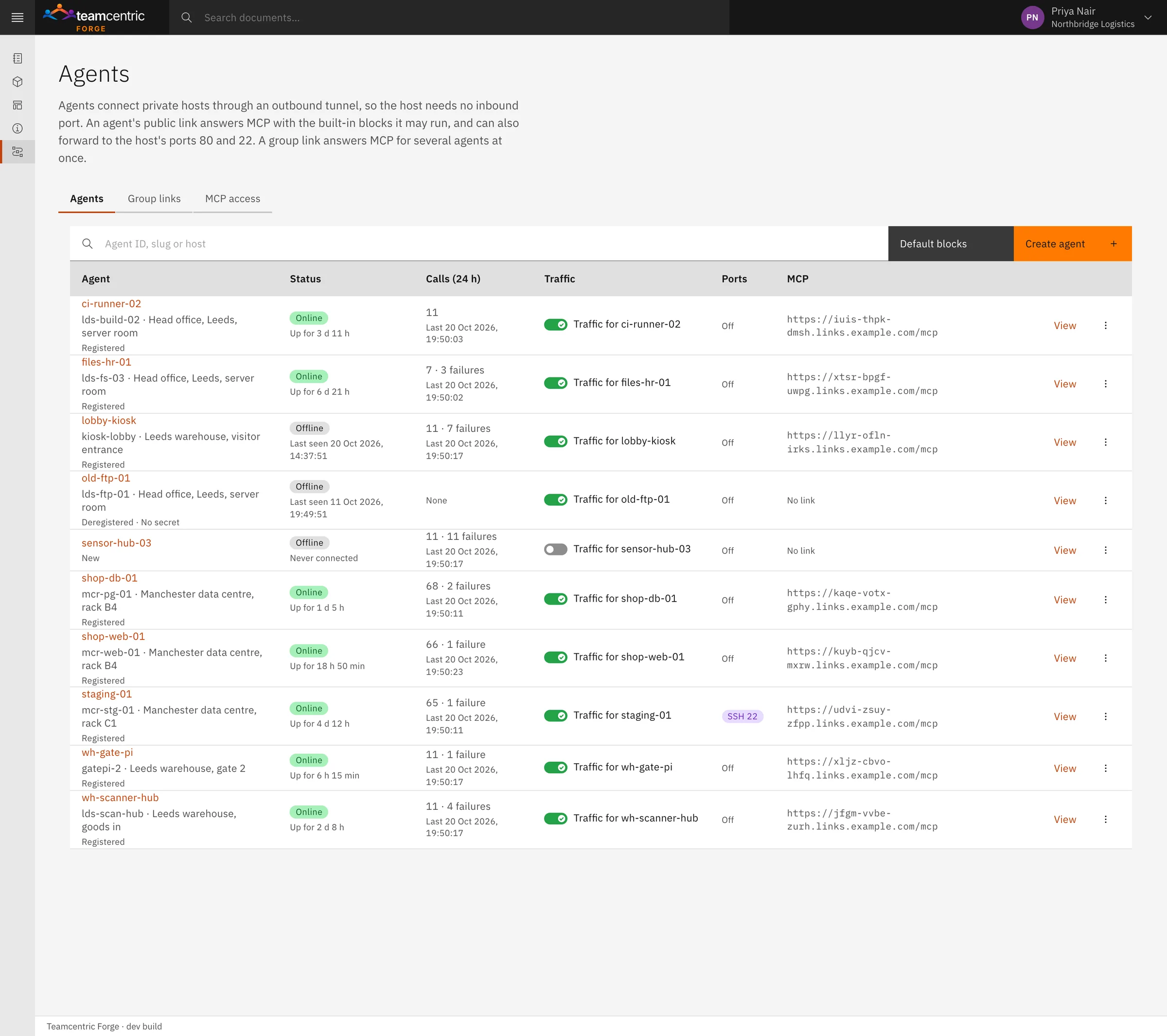
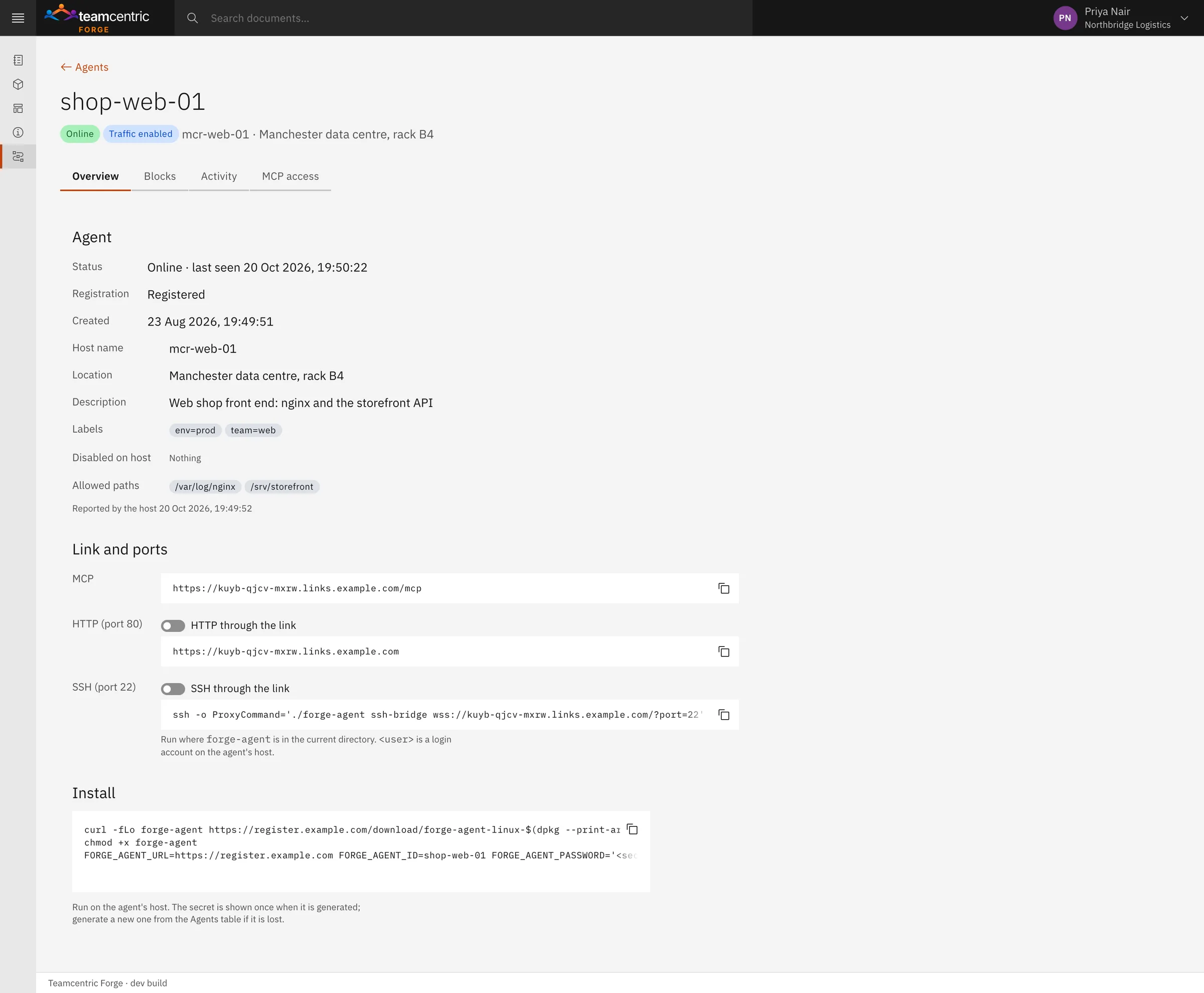
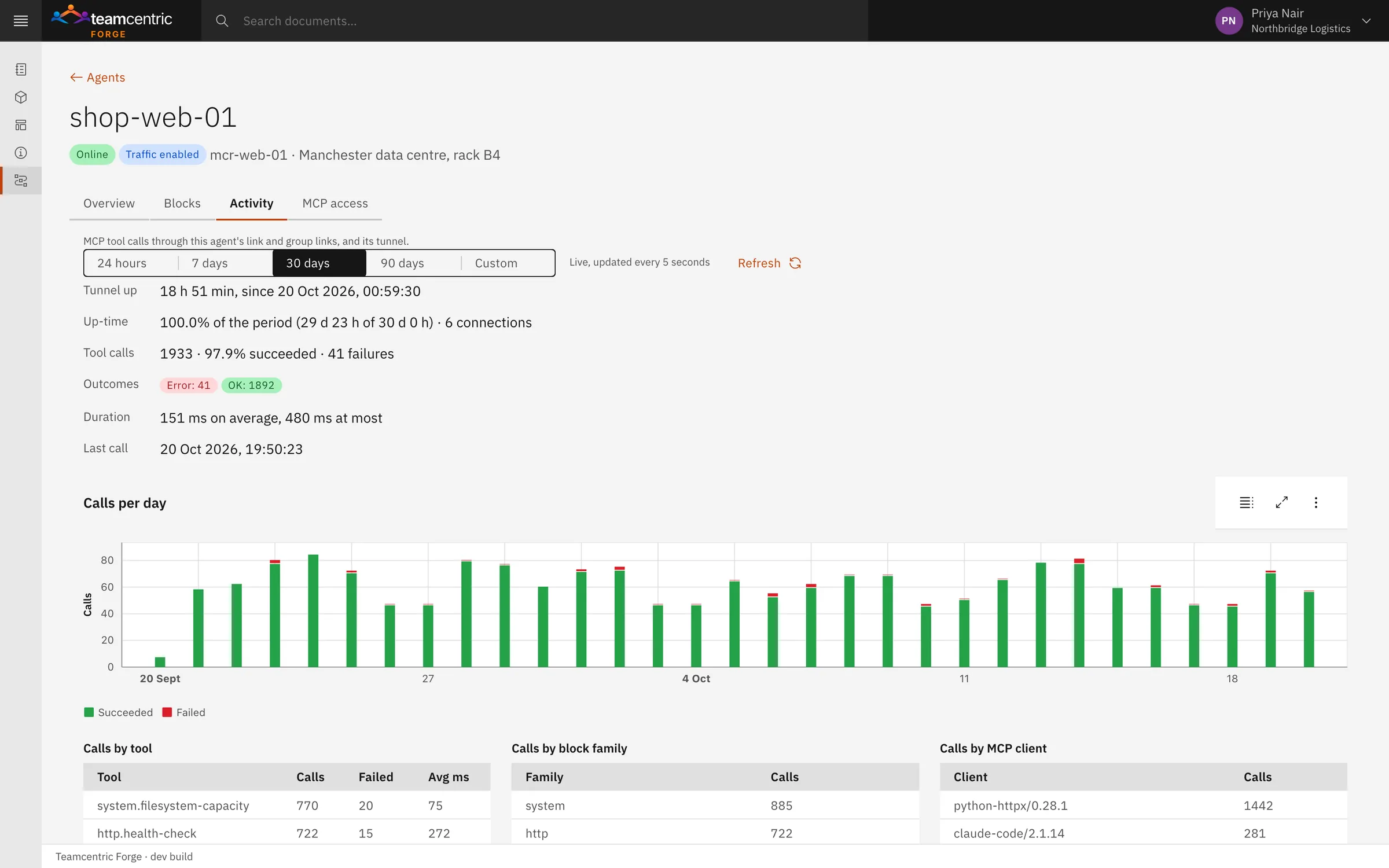
The Agents page shows every machine: online and for how long, or offline and when it was last seen; the checks run on it in the last 24 hours and how many failed; and a switch that turns its link on or off. Each agent's own page shows what the machine reports about itself, every check with its setting, its activity over up to 90 days, and the keys for its link.
Read-only checks
65 checks, and none of them writes
An AI assistant connected over MCP sees one tool per check the machine allows. Documents use the same operations. Checks run fixed programs with fixed arguments, never a shell.
- System
- Operating system, memory, CPU, disk space and inodes, load, uptime, installed packages, pending updates, clock.
- Files
- Whether a path exists, file and folder sizes, details, checksums, listings, text search.
- Network
- Interfaces, listening ports, connections and routes; DNS, TCP and TLS certificate checks from the machine.
- Processes and services
- Running processes, service status and configuration.
- Git
- Latest commit, branch, tag or release of a repository on the machine.
- Web
- Fetch a page or API, GET only, and check that a service answers.
- nginx
- Version, sites, certificates and a configuration test.
- Databases
- PostgreSQL today — activity, locks, tables, settings and replication. SQL Server, MySQL, MariaDB, MongoDB and the other popular production databases are coming soon. Off until an admin turns them on.
- Off until an admin turns them on
- Log files and the system journal; Docker containers, images, logs and disk use; firewall, SSH and Tailscale configuration.
Passwords for web and database checks stay in files on the machine; only the machine reads them, and they are masked in every answer. Known secret formats in logs and process lists are masked too.
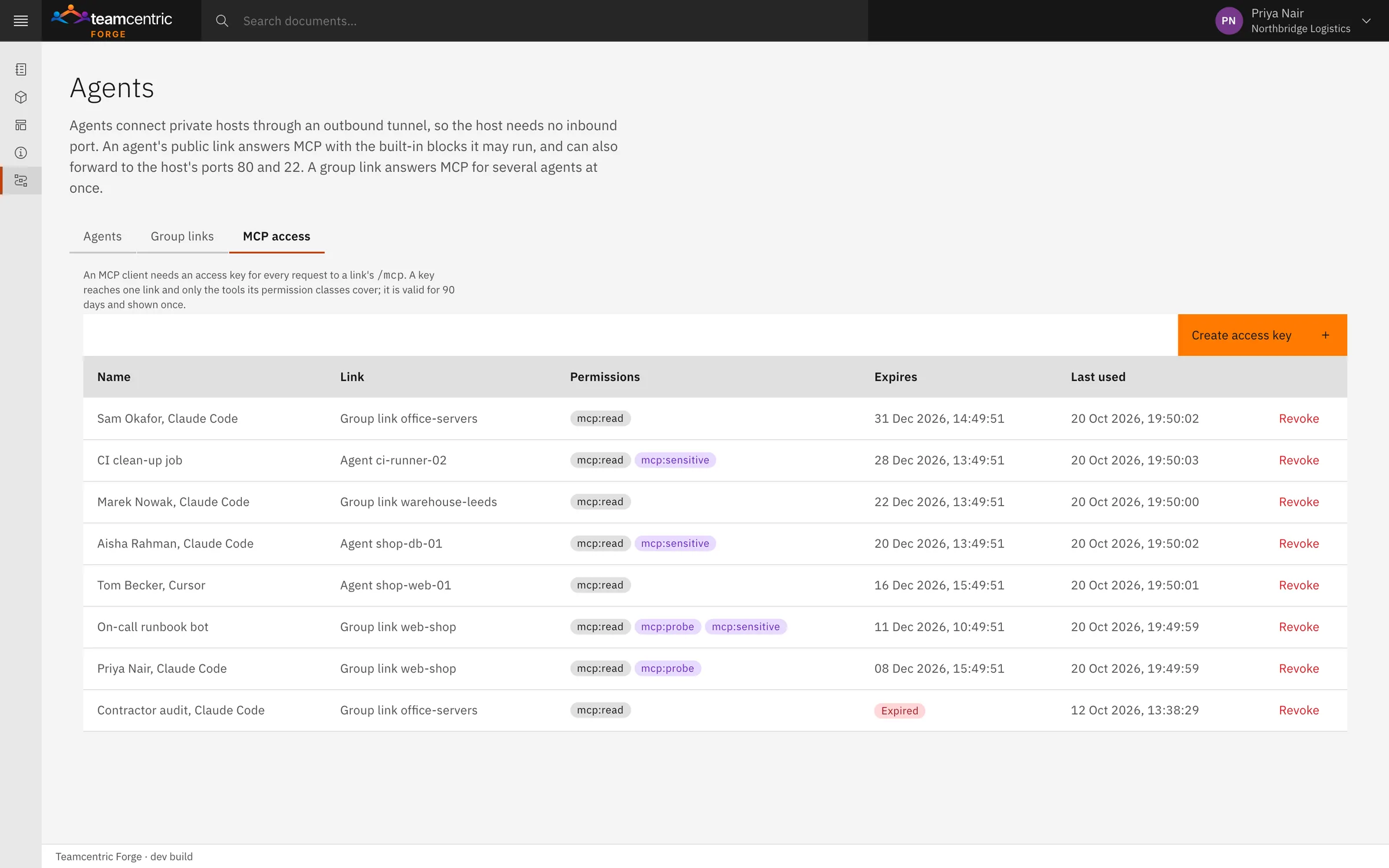
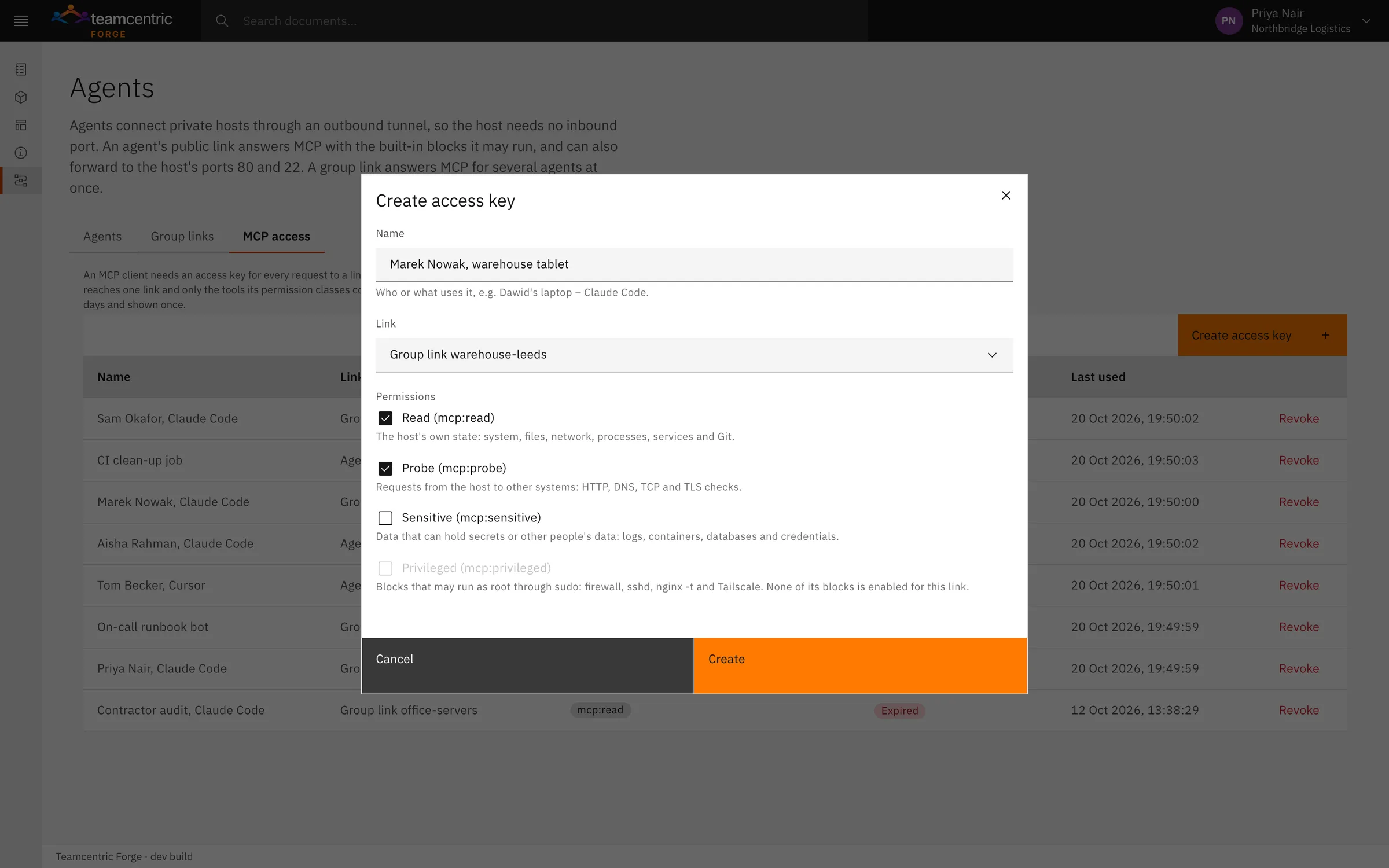
Access keys
Every request needs a key, and every key has limits
A key opens one link and only the kinds of checks it was given. It is shown once, expires after 90 days and can be revoked at any time. An unknown key gets the same answer as an unknown link, so a link address alone reveals nothing.
- Read
- The machine's own state: system, files, network, processes, services and Git. Given by default.
- Probe
- Requests from the machine to other systems: web, DNS, TCP and TLS checks.
- Sensitive
- Data that can hold secrets or other people's data: logs, containers, databases.
- Privileged
- Checks that may run with administrator rights, where the machine allows it: firewall, SSH configuration, nginx test, Tailscale.
Group links
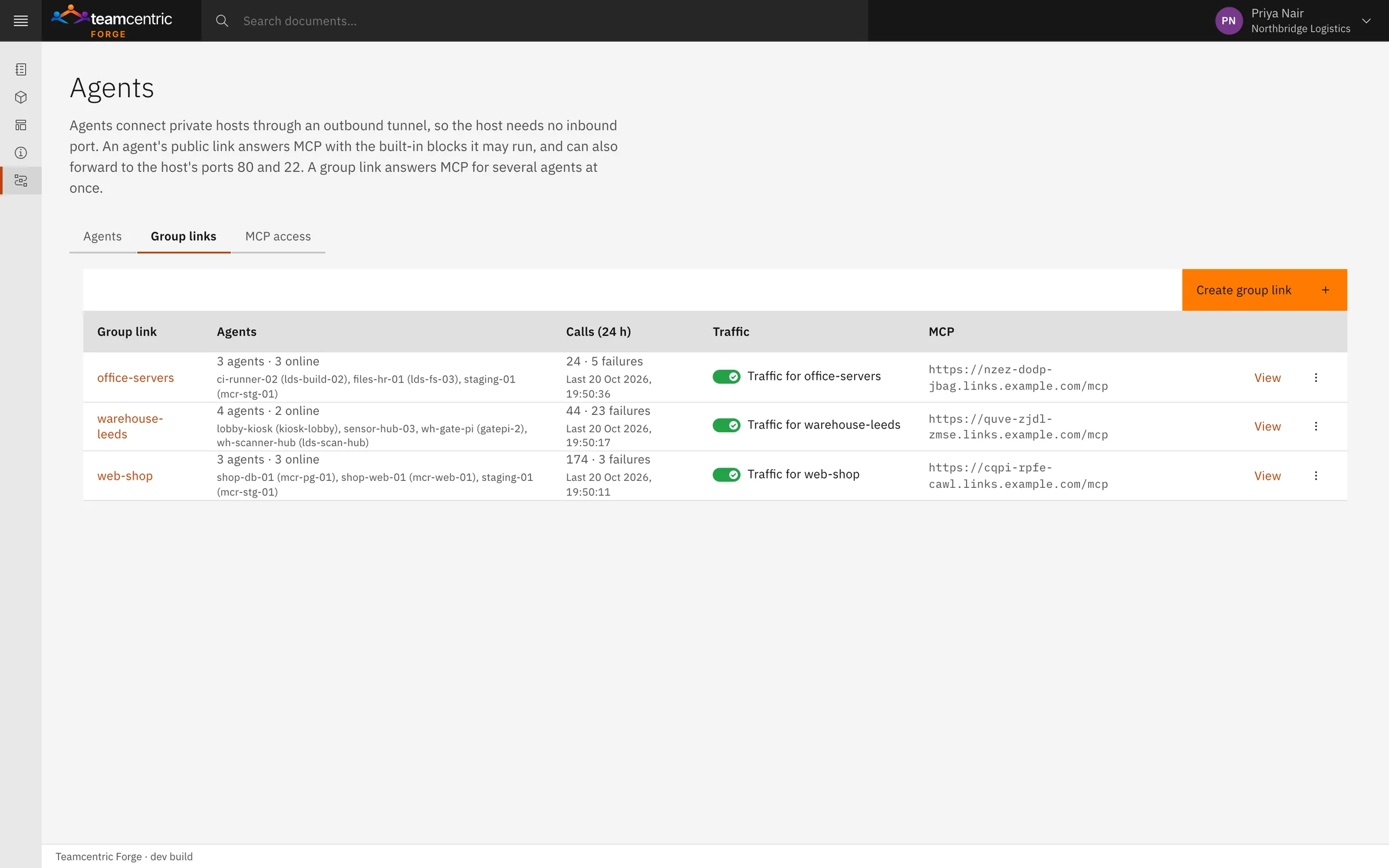
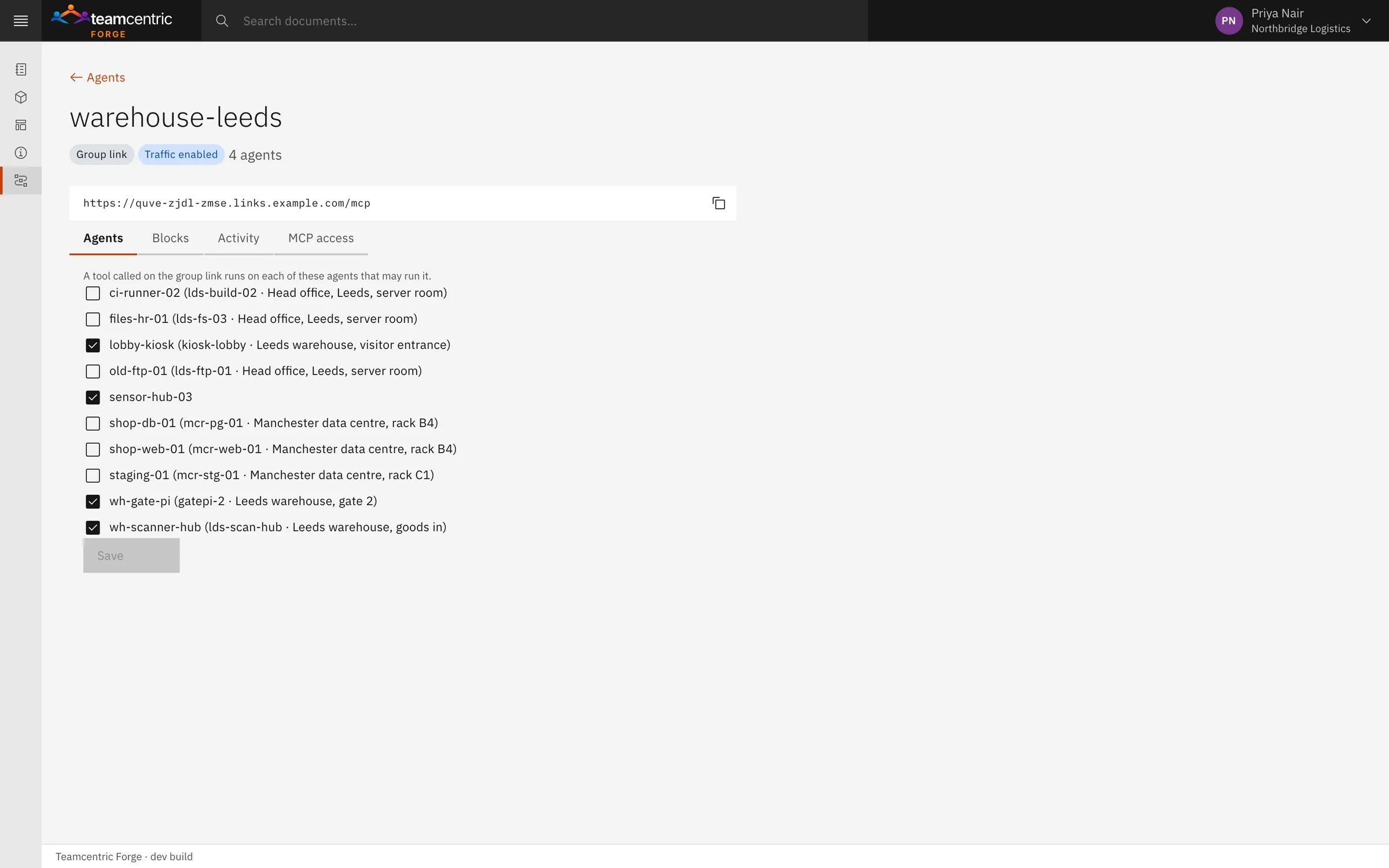
One question, many machines
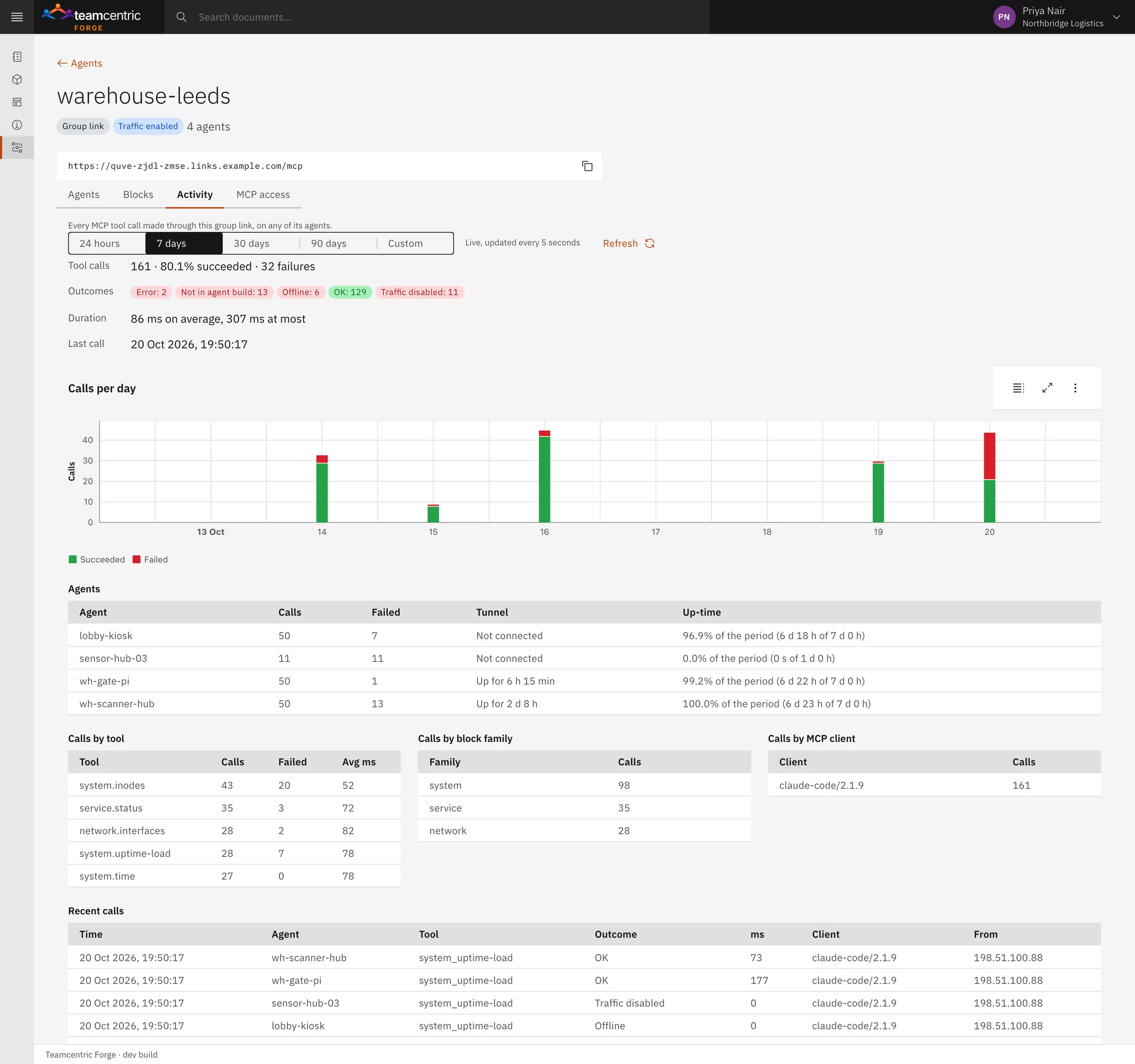
A group link puts several agents behind one MCP address — a site, a team, a purpose. An assistant asks once, and every machine that allows the check answers by name.
Machines that are offline, switched off or do not allow the check say so, and the others still answer. The assistant can narrow a question to some of the machines. Each group has its own page with its machines, the checks across them, and every call through the link with one row per machine.
Control
The machine has the last word
Admins choose checks for all machines, per machine and per group. The machine itself can go further, in a small settings file next to the agent. Forge shows those limits and cannot change them.
- Its own name, location, description and labels
- Checks it never runs, and whole kinds of access it refuses: AI assistants, web or SSH
- The only folders checks may look at, checked after following links
- The few checks that may run with administrator rights, each through one fixed command
Web and SSH access through a link are off by default and switched separately per agent. The web service and SSH server keep their own sign-in.
Activity and audit
Every AI call is recorded: which check, on which machine, through which link, with which key and assistant, how it ended and how long it took — never what was asked or answered. Activity is kept for 90 days. Every change to a document, block, agent, link, check or key, every publication, build report and agent registration, is in Forge's audit with who did it and when.
Documentation
The same checks keep your documentation true
Forge documents use the operations your assistants call. Where a document states a fact that lives in another system, it holds an executable block instead of a copied value.
release-evidence.md
---
title: Release Evidence
forge:
  version: 1
  profile: production
---

## Release under test

```docblock
id: latest-release
provider: git
operation: latest-release
parameters:
  repository: ./service-api
render:
  as: key-value
```- A block says where a fact comes from
- It names the operation — the latest Git release of a repository, the health of an endpoint — with its parameters and how to render the result. When the document is built, the block is replaced by the current value.
- Blocks build on each other
- A block can use the result of an earlier one, call a shared Library Block at a version range, or run a short inline Python script for a calculation.
- The source stays Markdown
- Headings, lists, tables, links and code work as usual, and the blocks are fenced YAML, so any Markdown tool can still read the source.
The library
Written, reviewed and published like code
Every document lives in the tenant's Document Library: drafted in the composer, published as an immutable version, and built from shared blocks that are versioned too.
- Document Library
- Every document a person may see, searchable by title, path, tag or block. Each row shows its library path, latest version, whether it has unpublished changes, and whether it is offline, private or shared.
- Composer
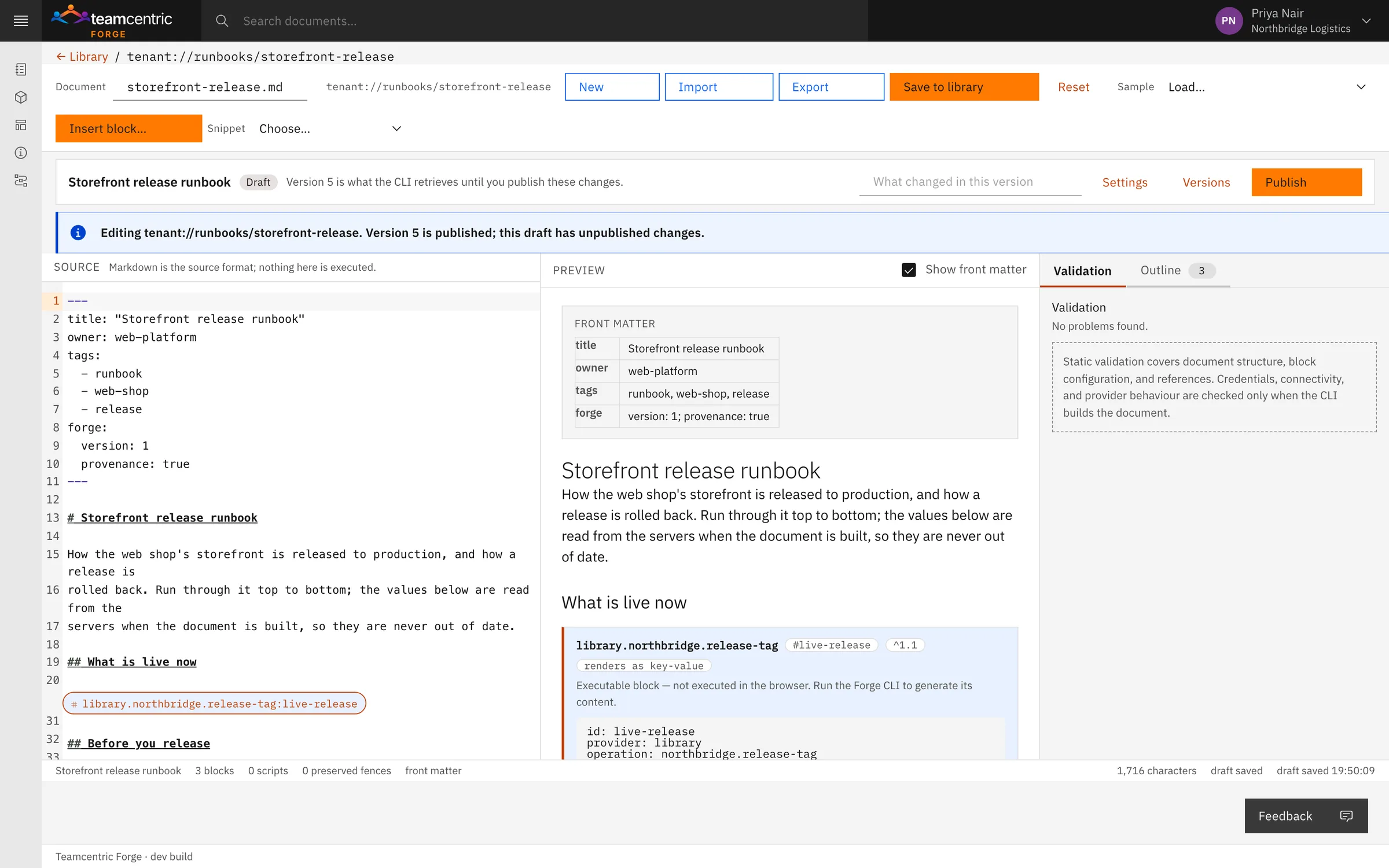
- Source and preview side by side, with each block shown as a chip and explained with a sample result. Validation runs as you type, and a document with errors cannot be published. The composer never runs a block, opens a connection or reads a credential.
- Published versions
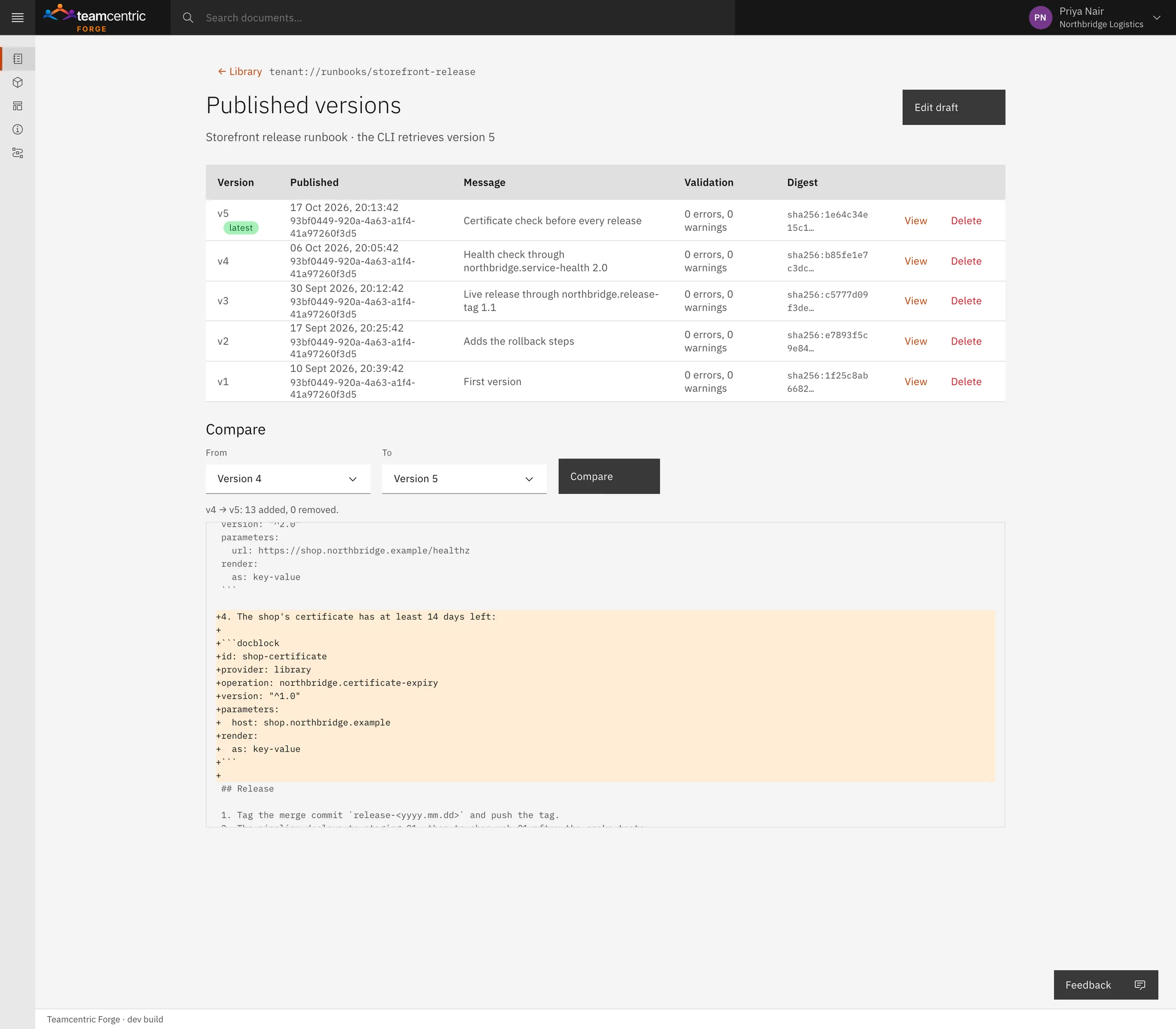
- Drafts are published as immutable versions, each with its note, validation results and a content digest. Compare any two versions, or the latest against the draft. Old versions stay readable, and the CLI can build any of them.
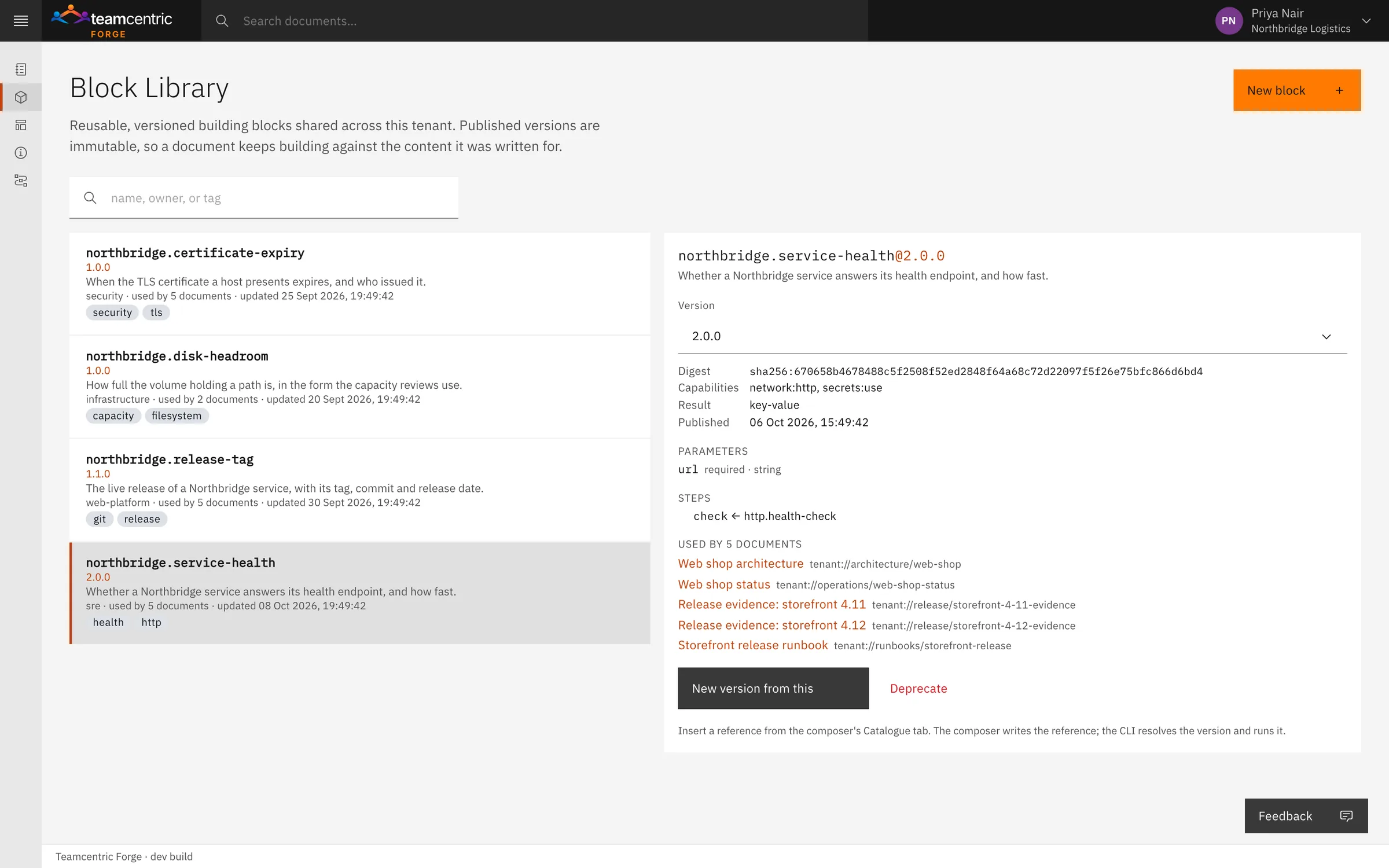
- Block Library
- A team's own way of reading a fact, published as a versioned block with its owner, parameters, operations and the documents that use it. A change is a new version; a deprecated version keeps working while authors move on.

Generation
Built on your own machines with the Forge CLI
Generation happens where the data lives. Neither the browser nor Forge's servers ever execute a block or resolve a credential.
- Credentials stay where they are
- The CLI fetches a published version and the Library Blocks it needs, then runs each block with the machine's own access and the credentials in its local files.
- Only a summary comes back
- Forge receives which version was built, by whom, how long it took and how each block ended. The generated Markdown, and the provenance record beside it, stay on the machine.
- Failures are visible
- A build reports how each block ended, and a document can say what to show when a block cannot be read.
- Builds can be paused
- Take a document offline, with a reason, and the CLI stops building it — without changing who can read it.
Live dashboards
Fresh state, with its age shown
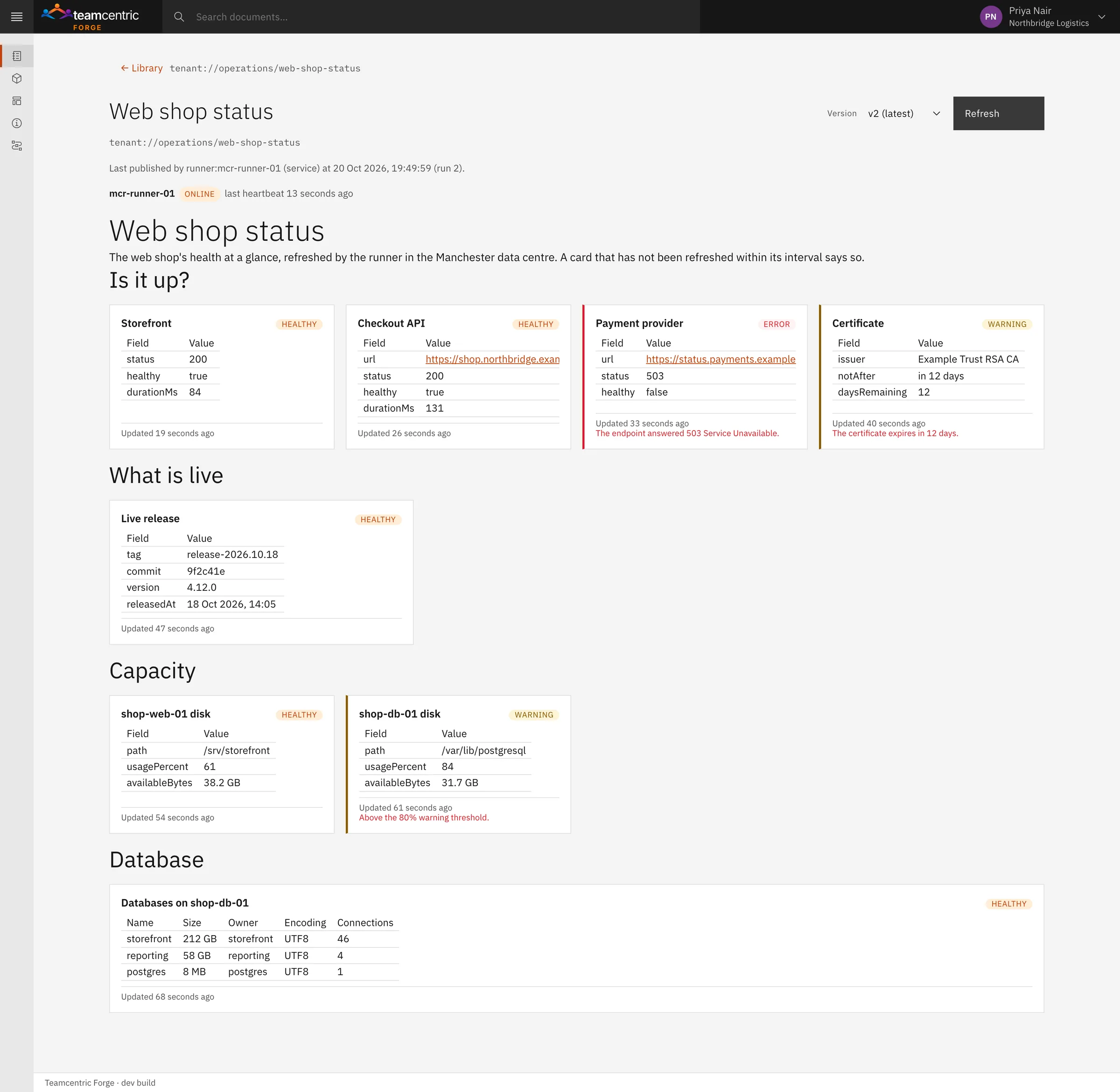
A document can also drive a live dashboard. A runner — the Forge CLI registered for the job, on a machine that can reach the data — keeps each card fresh on its own schedule.
Any block becomes a card
Each card has its own refresh interval and display: status, number, gauge, table or text. A one-minute health check and an hourly certificate check share one dashboard.
Every value shows its age
A card shows its value, its state, when it was updated and any error. One that misses its interval is marked stale, and one whose runner has gone quiet says publisher offline, rather than looking current.
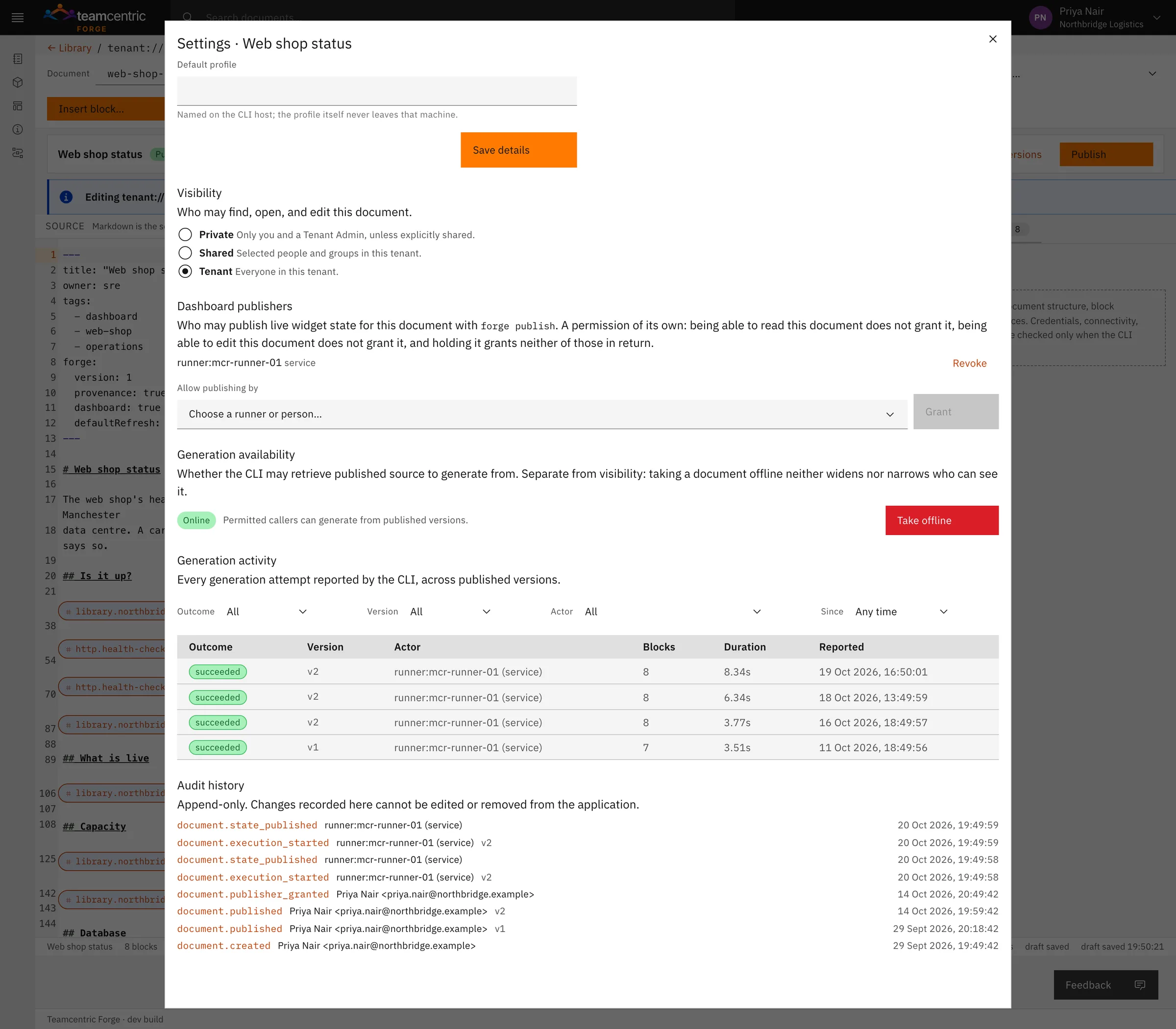
Publishing is granted, not assumed
A runner needs an explicit grant per document, separate from reading or editing it. Values resolved from credentials are redacted before results leave the machine.
Who it is for
For the people answerable for production
Forge is for teams that want AI assistants to answer questions about production without handing them a shell, and for teams that maintain runbooks, evidence and inventories by hand today.
- Teams using AI assistants
- Answers about one production machine or a whole group, through read-only checks and a key of their own.
- IT, security and compliance
- Read-only checks with the riskier ones off by default, limits the machine sets itself, scoped and expiring keys, a record of every call, and generation that never moves credentials.
- Platform and operations teams
- Runbooks, architecture pages and evidence that read their facts from the systems, and dashboards that say how fresh they are.
- Developers and support engineers
- Quick facts about a machine — releases, disk, services, certificates — from an AI assistant or a document, without a VPN or SSH.
- Managed service providers
- Documentation and read-only insight for machines on customer networks without asking customers to open ports. Customers keep the last word on their own machines.
Deployment
Run it where it suits you
Forge is in closed beta. Whichever way it runs, generation and checks happen on your machines, and agents and runners only ever connect out.
On your premises
Forge runs on your own infrastructure.
In your private cloud
Forge runs in a cloud environment your organisation controls.
Hosted by Teamcentric
For small teams: Teamcentric runs Forge for you.
- People writing and reading
- A modern web browser and a Forge account.
- Machines that build or run dashboards
- The Forge CLI, with outbound HTTPS to Forge and access to the systems the documents read.
- Machines reached through Forge
- Linux on amd64, arm64 and armhf, with outbound HTTPS; Windows is in testing and available soon. The agent is one binary and needs no inbound ports. It runs as whichever account you choose, and its checks see what that account may see.
- AI assistants
- An MCP-capable assistant or tool that can send an access key with each request. For web and SSH access, a browser and a standard SSH client.
All traffic is encrypted in transit (TLS).
Questions
What people ask first
- Can an AI assistant change anything on our machines?
- No. Every check reads; none restarts, edits or deletes anything. Checks run fixed programs with fixed arguments, never a shell or a command the assistant chooses.
- What stops someone who finds a link?
- Every request needs an access key for that link. Without one, a link gives the same answer as one that does not exist. Keys expire after 90 days and can be revoked one by one; removing a link revokes its keys.
- Can an assistant read logs, databases or secrets?
- Only if an admin turns those checks on and gives the key the Sensitive class. Passwords stay in files on the machine and are masked in answers, and known secret formats are masked in logs and process lists.
- Does the agent open any ports on our machines or network?
- No. The agent connects out over HTTPS. Nothing listens for inbound connections on the machine's network.
- What happens if a machine loses its connection?
- The agent reconnects by itself and its link stays the same. Forge shows it as offline, with when it was last seen, until it is back. In a group link, the other machines keep answering.
- What does the agent cost the machine?
- One small process holding one connection open. It is designed for checks and administrative access rather than high volumes of traffic: each agent runs a few checks at a time, and further requests wait their turn.
- Does Forge need our credentials?
- No. Documents are built on your own machines, with credentials in local files there. Forge stores the published source and a summary of each build — not the generated document, and not any secret.
- Can a change to a shared block break our documents?
- No. Published block versions never change. A document builds against the version range it names, and a deprecated version keeps working while authors move on.
What it does not do
Forge is in closed beta. The first list is what is not available yet; the second is what it is deliberately not.
Not available yet
- Forge agents for Windows — in testing now, and available soon; today agents run on Linux
- Checks for SQL Server, MySQL, MariaDB, MongoDB and other popular production databases — coming soon; PostgreSQL today
- Sign-in for web-based AI assistants — coming soon; today an assistant sends an access key with each request
- Single sign-on — Forge accounts sign in with email and password
Not the job
- Changing a machine — every check reads; none restarts, edits or deletes
- A remote shell — checks run fixed programs with fixed arguments
- Opening inbound ports — agents and runners connect out
- Executing anything in the browser or on Forge's servers — generation happens only on your machines
- Monitoring or alerting — a dashboard shows fresh state with its age
- A secrets manager — credentials stay in local files on your machines
- A CI/CD engine
Ask a production machine a question, safely
See an AI assistant query a machine on your network through a scoped, read-only key, with no inbound ports — then watch a runbook read its facts from the same systems. Forge is in closed beta, so we start with a demo built around your environment.