Teamcentric Blueprint
AvailablePlan the work on a map, and keep what it is for attached to it.
A story map where a card is more than a title: the outcome it serves, its acceptance criteria, the scope and constraints around it, and the references that apply. When the work starts, that intent is assembled into a Markdown prompt instead of being explained again.
Teamcentric Blueprint is available. There is no self-serve signup: a workspace and its accounts are set up for your organisation.
The problem
The map survives. The thinking behind it does not
Most planning tools record what was decided and lose why. By the time a card is picked up, the outcome it was for and the constraints around it live in somebody's memory of a meeting.
- A backlog item that says “Build password reset”, and nothing else
- Acceptance criteria agreed in a meeting and written down in nobody's ticket
- A story map drawn on a wall, photographed once, and never opened again
- Constraints the team already knows, retyped into an assistant by whoever happens to be using it
- An order of work that made sense before the release dates moved
The board
Story mapping worth using on its own
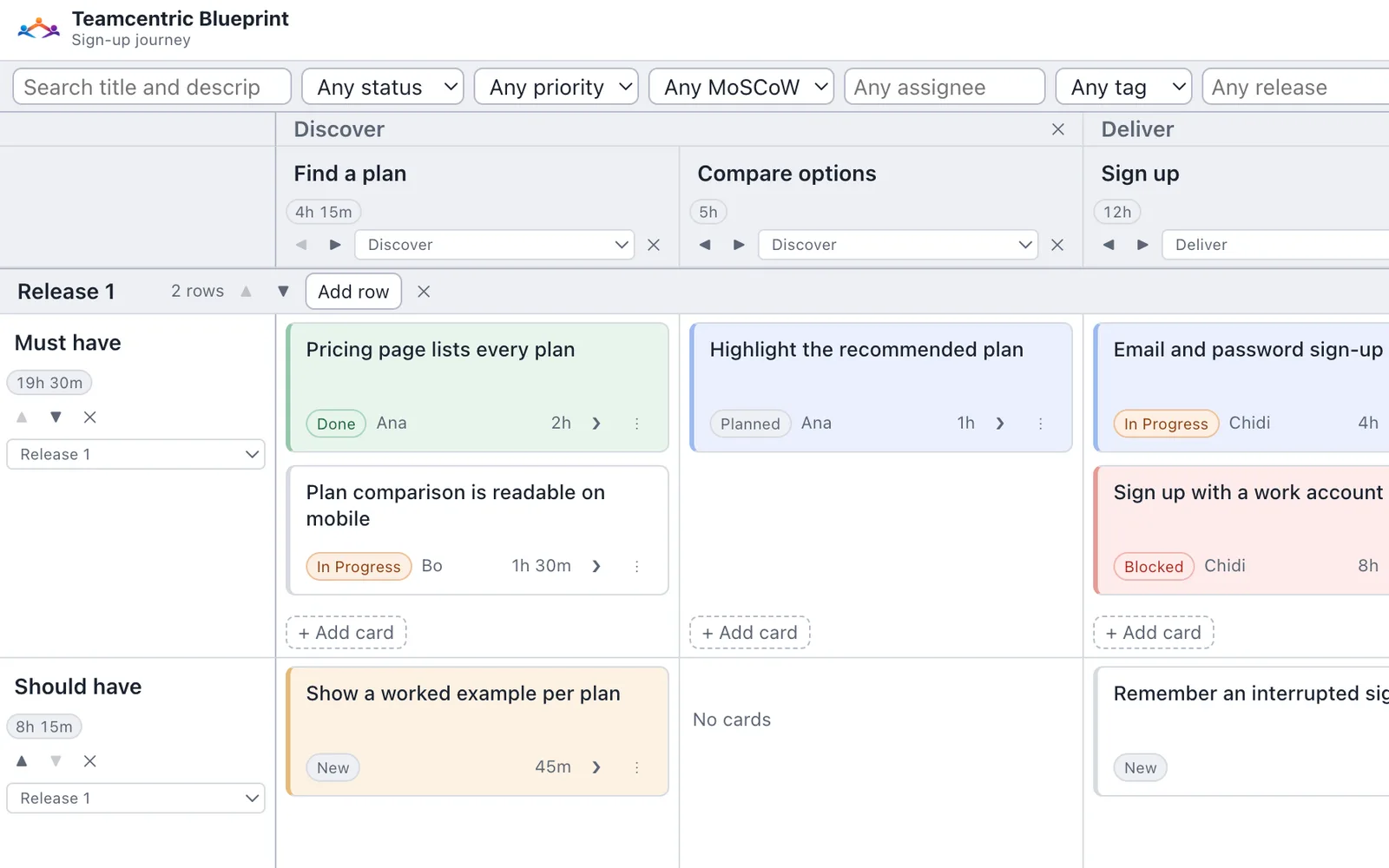
Before anything else, Blueprint has to be a good map: a backbone you can restructure while you talk, cards you can move without thinking about it, and a board that stays legible once it is large.
- A backbone, grouped into activities
- Columns run left to right; each column belongs to at most one group, and a spanning header appears over every contiguous run that shares one. Deleting a group unassigns its columns and deletes nothing.
- Swimlanes and rows
- Rows group into swimlanes and move between them through a selector. Structure is created, renamed, reordered and deleted in place, and any group, column, swimlane or row heading can carry notes of its own, so the shape of the map keeps up with the conversation about it.
- Cards with the planning fields you expect
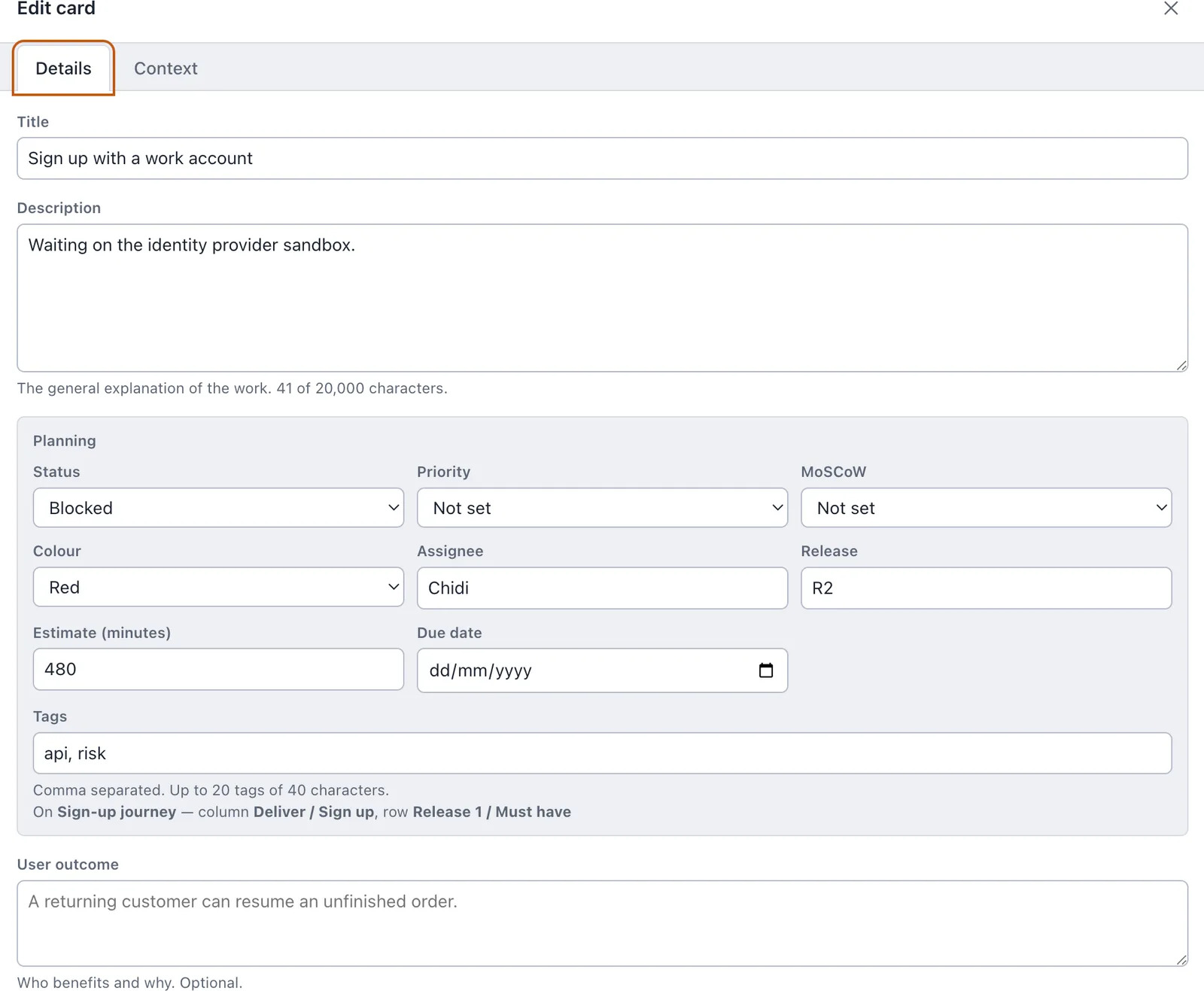
- Title, description, status, priority, MoSCoW level, assignee, tags, colour, estimate in minutes, due date and release — enough to prioritise and sequence on the board itself rather than in a second tool.
- Estimates that add up where you are looking
- Each column and each row shows the total of the estimates in it, counted across the whole board rather than the filtered view. Where nothing has been estimated there is no total at all, because an absent estimate is not zero.
- Drag by pointer or by keyboard
- Cards reorder within a cell and move between cells either way, and a Move dialog covers any destination as the accessible alternative. An empty cell is a real drop target, tested as one.
- Search and filters that keep the map
- Case-insensitive search over title and description, combined with status, priority, MoSCoW, assignee, tag and release filters. Board structure stays visible while filtering, and matching and total counts are both shown.
- Undo that covers structure, not just text
- Up to 50 actions for the open board, by toolbar or keyboard — including moves, edits, and deleting a populated row or column, which comes back with its cards.
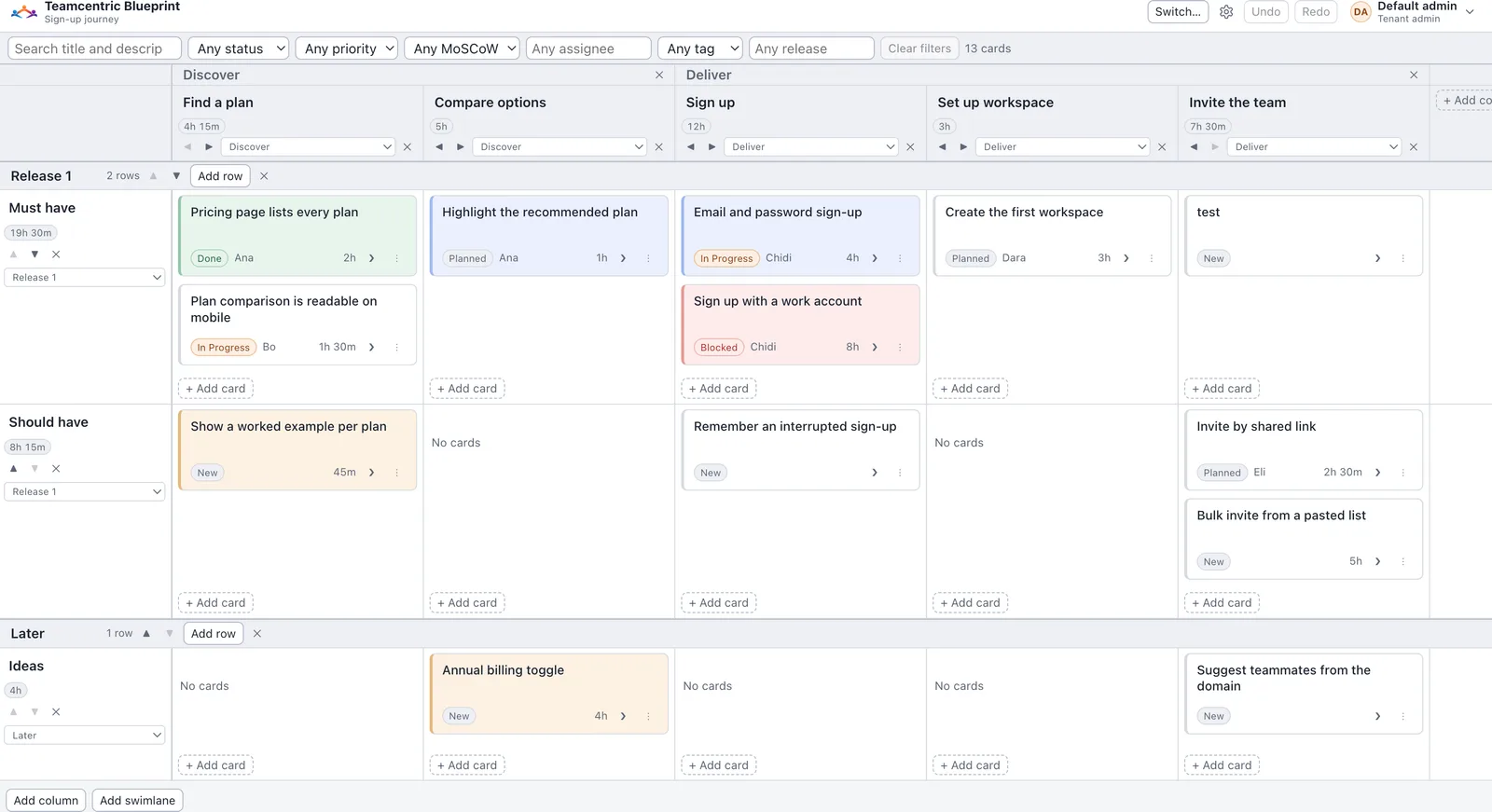
One deliberate limit, stated on the toolbar as well as here: dragging is disabled while a search or filter is active. Editing still works. Reordering against a list you can only partly see produces a result nobody intended.
Start rough in a mind map
A mind map is a second kind of board, owned and shared the same way. Any node or branch can generate a story map, either as a new board or by updating the board it produced before. Every generated group, column and card links back to the node it came from. Generation is a copy, not a sync: editing a node changes no card until you generate again, and an update never deletes what a removed node produced.
Mind maps import from JSON, as a whole map or as a branch, and export as JSON, a PNG image or a Markdown outline.
- Depth 1
- Columns by default, or column groups if you choose the grouped layout
- Depth 2
- Cards in their column — or, in the grouped layout, columns beneath their group
- Deeper levels
- Cards, with one swimlane per depth; a card below the first card level is linked from its parent card by a contains relationship
- Node notes
- Card descriptions, or notes on a group or column heading
The unit of work
A card holds the intent, not just the label
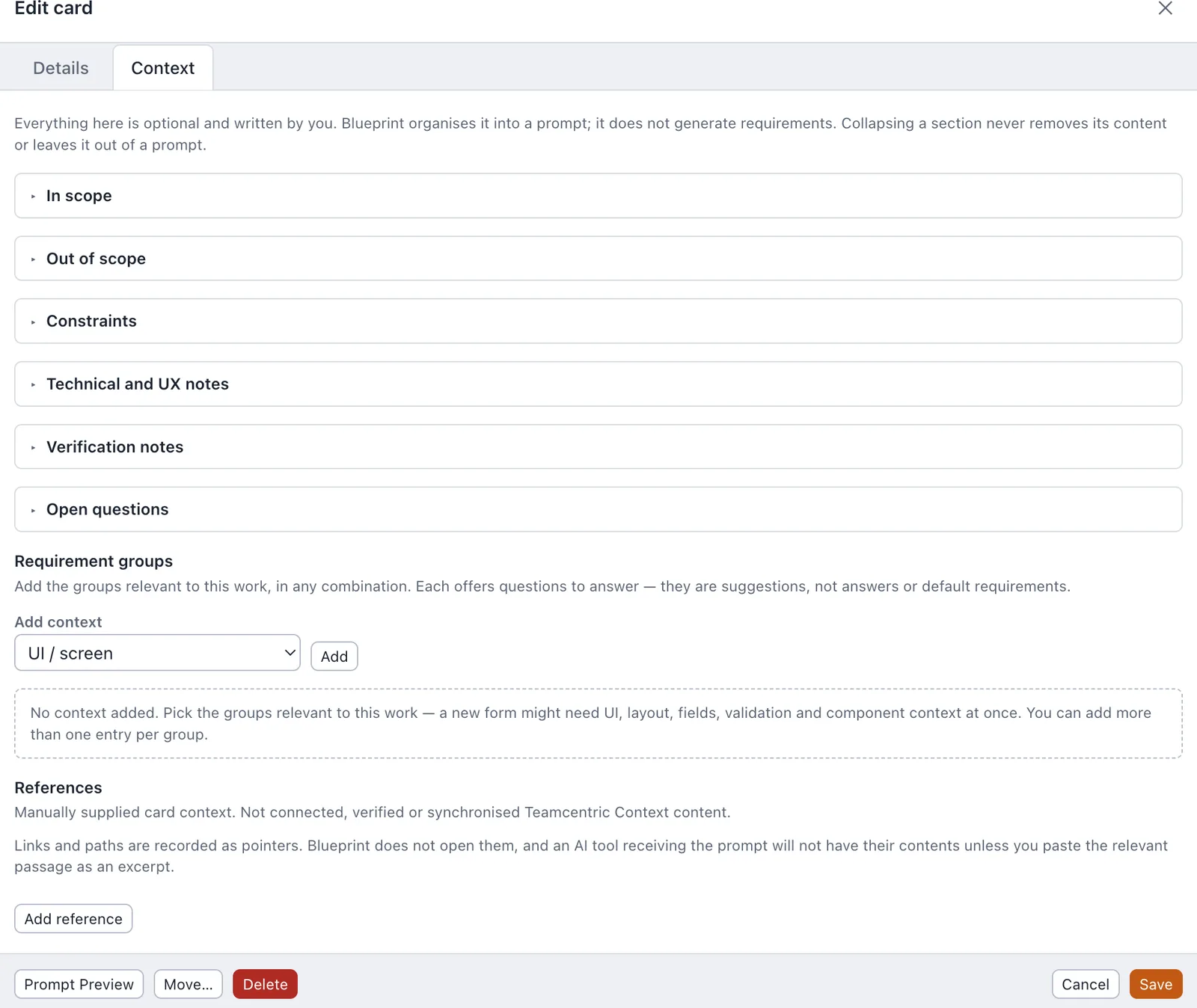
Three tabs over one draft: Details, Context and Architecture. Every field is optional and starts empty, so a title-only card stays perfectly valid — and a card that somebody has to implement next week can carry everything that was agreed about it.
- Details
- Title, description and the planning block, then the two fields that decide whether a card can be worked on: the user outcome it is for, and its acceptance criteria.
- Context
- Scope and out of scope, constraints, technical and UX notes, verification, and the open questions nobody has answered yet — each collapsed until it holds something.
- Requirement groups
- A catalogue of twenty groups — forms, validation, components, accessibility, states, data rules, API, defect reproduction and more, ending with an Other context group you head yourself — each offering writing prompts. They are questions to answer, never answers. A card can carry several entries in one group.
- References
- A label, an optional URL or repository path, why it applies, and an optional pasted excerpt. Nothing is fetched: a locator stays a pointer, and only an excerpt you paste is carried anywhere. The preview says which is which.
- Architecture
- The card's own software context — application, layer, component type, domain, responsibility, runtime, security boundary, technologies, interfaces, dependencies and constraints — shown beside what it inherits from the board, swimlane, row and column. Its typed relationships to other cards, and any open findings about it, sit on the same tab.
Prompt preparation
The AI-facing part contains no AI
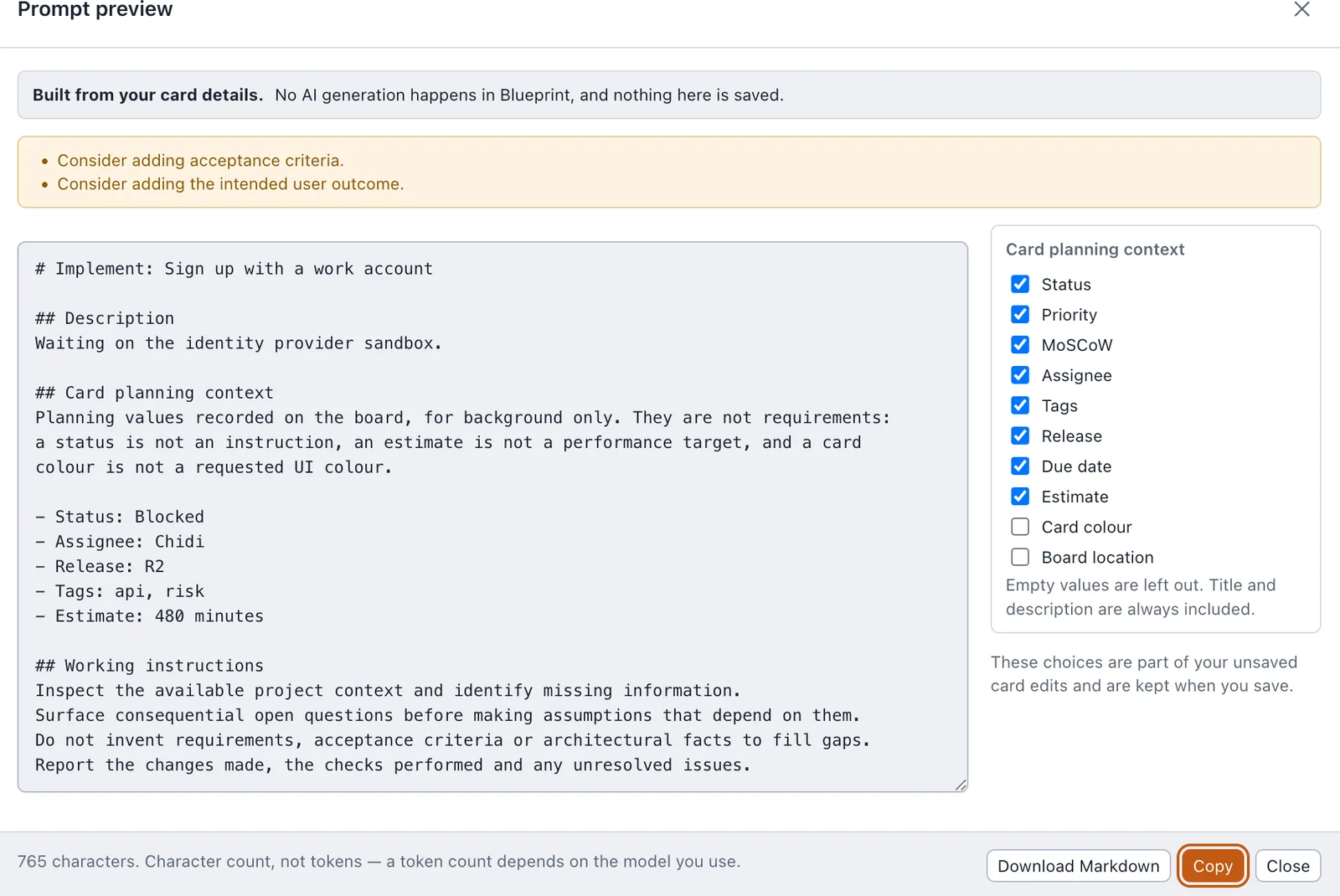
A Prompt Preview button on every card and in the editor assembles a Markdown implementation prompt from the card and the architecture context it inherits. Blueprint calls no model and holds no model API key: every line was written by a person, or by an agent you gave write access, and Blueprint never generates a requirement.
- Assembled, never generated
- The document is built from the card's fields, the architecture context it inherits and its relationships to other cards, in a fixed order, with each inherited value labelled with where it came from. You choose which scopes' context to include — full inheritance, the card alone, or the card with its row or column — and whether the source labels are shown. It is read-only — you change it by editing the card. Empty sections are omitted and nothing is invented to fill a gap.
- A missing answer is said, not scored
- A card with no outcome, no criteria, or neither a description nor a scope produces a plain advisory — consider adding acceptance criteria — rather than a placeholder, a percentage or a readiness score.
- Planning values are quoted as planning values
- Status, priority, MoSCoW, assignee, tags, release, due date and estimate are included per field and labelled as what they are; colour and board location are offered but off by default. A status is not an instruction, an estimate is not a performance target, and a card colour is not a requested UI colour.
- Working instructions, not a persona
- The document closes with instructions to inspect the available context, surface consequential open questions before assuming an answer, invent nothing to fill a gap, and report what was changed, what was checked and what remains unresolved.
- Previewing changes nothing
- Opening the preview never saves the card, changes its status or starts a drag. From the editor it shows the current draft and says so; from the board it shows the committed card.
- Length in characters, not tokens
- A token count depends on a model and a tokenizer that have not been chosen. Output past 50,000 characters is reported with its largest sections named, and is never silently truncated.
- Copy or download, honestly
- Both act on what is shown, without saving the card. Where the browser refuses clipboard access the failure says so and points at the selectable text and the download, rather than claiming a copy that did not happen.
Agents
Agents work on the board through MCP, as you
A remote MCP endpoint with eighteen tools lets Claude, ChatGPT, Codex or another client list boards, read a card with its effective context and relationships, and query components and the dependency graph — and, only where a token allows it, create boards and cards, update cards and context, manage relationships, apply named board operations and report findings. Every call goes through the same API, tenancy and revision checks as the browser.
A write against a stale revision is refused, never rebased: the agent re-reads the board and decides again. Each agent write saves the board as it was before and after, and the Version menu opens those saved revisions read-only.
MCP client → /mcp, bearer token → Blueprint API → PostgreSQL
- Person
- A token acts as the person who created it and never more. A viewer's token cannot edit, and another tenant's boards stay invisible.
- Boards
- Every board that person can reach, now or later, or only the boards you tick, plus any the token creates itself. Listing the dashboard and creating boards are separate choices.
- Operations
- Each operation type an agent may perform is ticked separately — create a card, update a card, delete a row, report a finding. Anything unticked is refused by the API.
- Lifetime
- 7, 30 (the default), 90 or 365 days, or no expiry. A token cannot be widened later; revoking stops it on the next request. The secret is shown once and only a keyed hash of it is kept.
Tokens are created in Account Settings. A token cannot create, list or revoke tokens itself.
Intended architecture, and what an agent actually found
Record the domain, layer, technologies and source paths once, on a board, swimlane, row or column, and the cards beneath inherit them, with each value showing where it came from. Link cards with typed relationships. An agent that has read your code can then report where the implementation differs. Blueprint never reads a repository itself.
- Intended
- The architecture your team recorded: context on the board, swimlanes, rows, columns and cards, and the typed relationships between cards.
- People, or an agent with an explicit grant
- Observed
- A finding: what an agent saw in the code — drift, a missing component, a broken constraint or a note — with source locations and, ideally, the commit as evidence. Recording one changes nothing that was intended.
- An agent with the report grant
- Accepted
- A finding's proposed change, applied as an ordinary edit that one undo reverses; a finding with no proposal is acknowledged. Either can be dismissed instead, and every finding stays on record.
- A person who can edit the board, in the Reconciliation panel or the card editor. No token can be granted this
How it works
From the shape of the work to the work itself
The same board serves the planning conversation and the moment a card is picked up, which is the point: there is no second document to keep in step with the first.
-
Map the backbone
Lay out the activities and steps as columns, group the ones that belong to the same journey, and put the work into swimlanes and rows beneath them.
-
Say what a card is for
Open the card and record the outcome, the acceptance criteria, the scope and constraints, and the references that apply. Existing title-only cards stay valid — every field is optional.
-
Preview the prompt
Assemble the card's intent into Markdown, choose what is included, and read exactly what a developer or an assistant will receive.
-
Take it to the work
Copy or download the Markdown and use it wherever you implement — an assistant, a ticket, a pull-request description — or let a connected agent read the card directly through MCP. Blueprint keeps the card as the record of intent.
Access
Boards belong to people, inside an organisation
Each organisation is a separate tenant. A board is owned by the person who made it and shared deliberately, as an editor or as a viewer.
- User Their own boards
- Creates and plans boards they own, and opens boards shared with them as editor or viewer.
- Tenant administrator One organisation
- Everything a user can, plus the accounts inside the organisation. Administering people grants no sight of a colleague's board: an administrator reaches the same boards a user would.
- System administrator Platform only
- Administers tenants and their administrators. Reaches no board at all, in any tenant.
Sign-in is Blueprint's own email and password. Accounts are created by an administrator rather than by self-serve registration.
Persistence
A planning tool people trust is one that does not lose things
Everything on the board is written through the same operations, applied by the same code on both sides of the network, and kept in PostgreSQL rather than in the tab you happen to have open.
- Saved means the database has it
- Boards live in PostgreSQL however the application is started. There is no in-browser storage mode to fall back into, so the save indicator is a statement about the server rather than about the tab.
- One vocabulary of operations
- Every edit is a semantic operation — move a card, delete a column, create a row. The same vocabulary is the unit of undo, of autosave and of the API's batched writes, so the three cannot disagree.
- The browser and the server share a reducer
- Operations are applied by exactly the same code in both places. What you see after an edit and what the database records are produced by one implementation, not two that have to be kept in step.
- A conflict is never resolved behind your back
- Writes are debounced and sent one at a time, and a retry resends the identical request rather than duplicating it. If the board moved underneath you, the queue pauses and offers your unsaved operations as a download — there is no automatic overwrite and no silent merge.
- An open board hears about other saves
- When a colleague or an agent saves, an open board is notified and refreshes itself, or checks every 15 seconds if the notification stream is down. If you are editing a card or have unsaved changes, it waits rather than replacing your work.
- Large boards stay workable
- Only the cards near the viewport are rendered, including while a card is being dragged, and every cell remains a drop target. A 2,000-card board and a 500-card cell are fixtures in the test suite rather than situations to avoid.
- Undo is per session; the board is not
- Undo history resets when you switch boards or reload, and the boards themselves do not. What you undid is a property of your session; what you saved is a property of the database — and every saved change to a card's content becomes a card version you can open read-only and restore as a new version.
What it does not do
Blueprint is available and the board, its API and its storage are complete. The first list is what is not built yet; the second is what it is deliberately not trying to become.
Not built yet
- Connected Teamcentric Context artefacts — Blueprint's architecture context is its own, and is not synchronised with Context
- AI-generated work packages — an agent can write to a board through MCP within its grants, but Blueprint itself drafts nothing
- Live co-editing — open boards refresh when someone else saves, but there is no shared presence, and conflicts are detected rather than merged
- Mind maps through MCP — agents see story maps only
- Whole-board history for edits made in the browser — board versions are saved around agent writes only, though every saved card change keeps a card version
- Search across the context fields — search covers title and description
- Single sign-on and OIDC — authentication is Blueprint-owned email and password
- Re-importing a board Blueprint exported — boards export as JSON, PNG or PDF, but import reads the legacy format only
Not the job
- An issue tracker or sprint board
- A roadmap or Gantt chart
- A requirements-management suite
- A document editor or a wiki
- A model provider, an agent runner or a prompt library
- A code scanner — agents read the code; Blueprint records what they report
- A skills or capability tool — that is Teamcentric Skills
Start with the journey you keep re-explaining
Blueprint is available today, set up as a workspace for your organisation rather than through a signup form. Tell us which piece of work loses its detail most often on the way from the plan to the pull request.