Teamcentric Fibre
AvailableSee, replay and govern what your AI coding agents do.
One live, searchable record of every action your AI coding agents take, on every machine. Replay any session change by change, follow every task from the prompt to the result, and check what the agents said against what actually happened. Installed on your own infrastructure; nothing leaves your network.
Teamcentric Fibre is available. It is installed on your own infrastructure, so access starts with a demo and a conversation about your environment.
The problem
The agents do the work. The record stays on one laptop
Coding agents now run shell commands, edit files, install packages, push to git and connect to servers, many times a minute, across dozens of machines. Each agent's account of what it did sits in files on one person's machine, so the questions people need answered have nowhere to go.
- Security and compliance
- Which agent ran curl … | sudo bash on the bastion host? Did anyone paste a production key into a prompt? Who force-pushed this morning, and did a person approve it?
- Engineering leads
- The agent reported “fixed, all tests pass”. Did the tests run, and did they pass? Which files did it really change, and what exactly changed in them?
- When it goes wrong
- An agent spent forty minutes on a two-line fix, or broke a build. What did it do, in what order, and where did it start going wrong?
- Platform teams
- Who uses agents, on which projects, at what cost in tokens; which agent or model does a kind of work better; and where the agents get stuck or keep retrying.
- The agent vendor
- Cannot help: its dashboards do not show what happened on your machines, do not compare one vendor's agent with another's, and many organisations cannot send their code, commands and prompts to another outside service.
How it works
Inside your network: collectors for Claude Code and Codex, a proxy for the rest
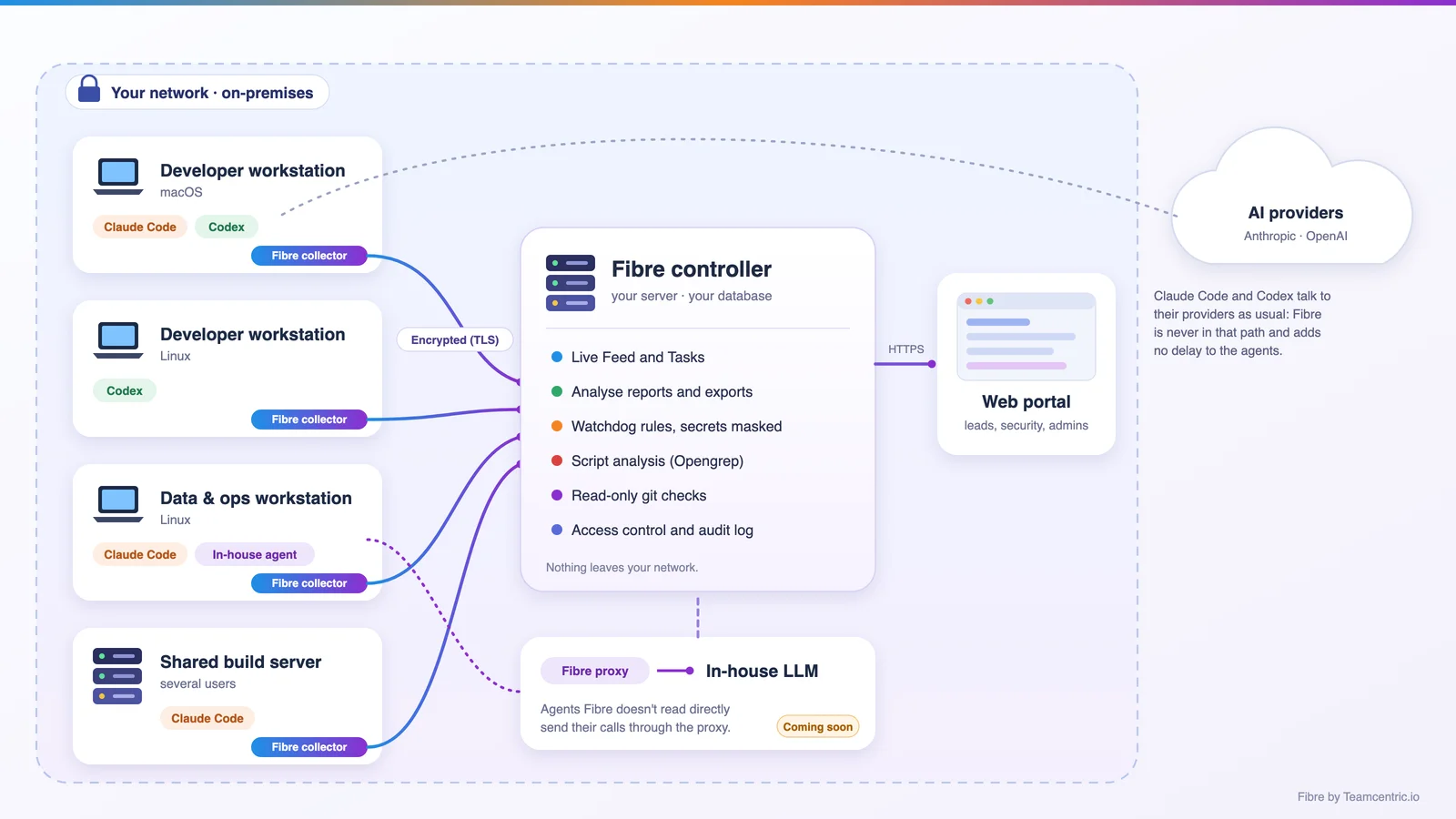
Collectors read what Claude Code and Codex already record and send it, encrypted, to a controller on your own server; those agents keep talking to their AI providers exactly as before. Any other compatible AI tool or LLM is captured through the Fibre proxy.
- Collectors
- A small background program on each workstation or shared server where people use agents. It reads the records the agents already keep, so the agents need no change, and keeps the activity safely on the machine if the connection drops.
- macOS and Linux · per-user or system-wide
- Controller
- Receives activity from every collector over encrypted connections, works out tasks, sessions, analysis, insights and watchdog findings as it arrives, and serves the portal.
- A Linux server you run, with PostgreSQL
- Web portal
- Where people work. Engineers see their own activity, leads and security staff see what they are allowed to, and administrators manage users, collectors, rules and thresholds.
- Any modern browser
- Fibre proxy
- For agents Fibre cannot read directly: your own tools, other AI coding tools, or an in-house LLM. Their calls pass through the proxy and appear alongside Claude Code and Codex, and it can be customised for the tooling and models you use.
- Any compatible AI tool or LLM
Key facts
On-premises is the reason most teams choose Fibre over a hosted tool, so it is stated first.
- Runs in-house
- The controller and its database on your server, collectors on your machines, the portal in your browsers. No agent activity, code, prompt or command is sent to Teamcentric or any other third party, and it works without internet access.
- Agents
- Claude Code and Codex are read directly, including their subagents and Codex review sessions. Any other compatible AI tool or LLM, including in-house ones, is captured through the Fibre proxy.
- Platforms
- Collectors for macOS and Linux workstations and servers; Windows collectors are coming soon. The controller runs on Linux.
- Agent telemetry
- Optional. Where you switch it on, collectors also receive the agents' own OpenTelemetry: each request to the model and its timing, failed requests and retries, approval waits, MCP servers and skills. It stays on the machine and your controller, and can still be forwarded to an observability tool you already use.
- Live
- New activity appears within a second or two. Running tasks, idle tasks and tasks waiting for a person's answer are visible as they happen.
- Secure by default
- TLS with your own certificates, per-user access scopes and features, an audit log of administrative actions and of every file read from a machine, and secrets masked automatically.
Sessions
Replay any session, change by change
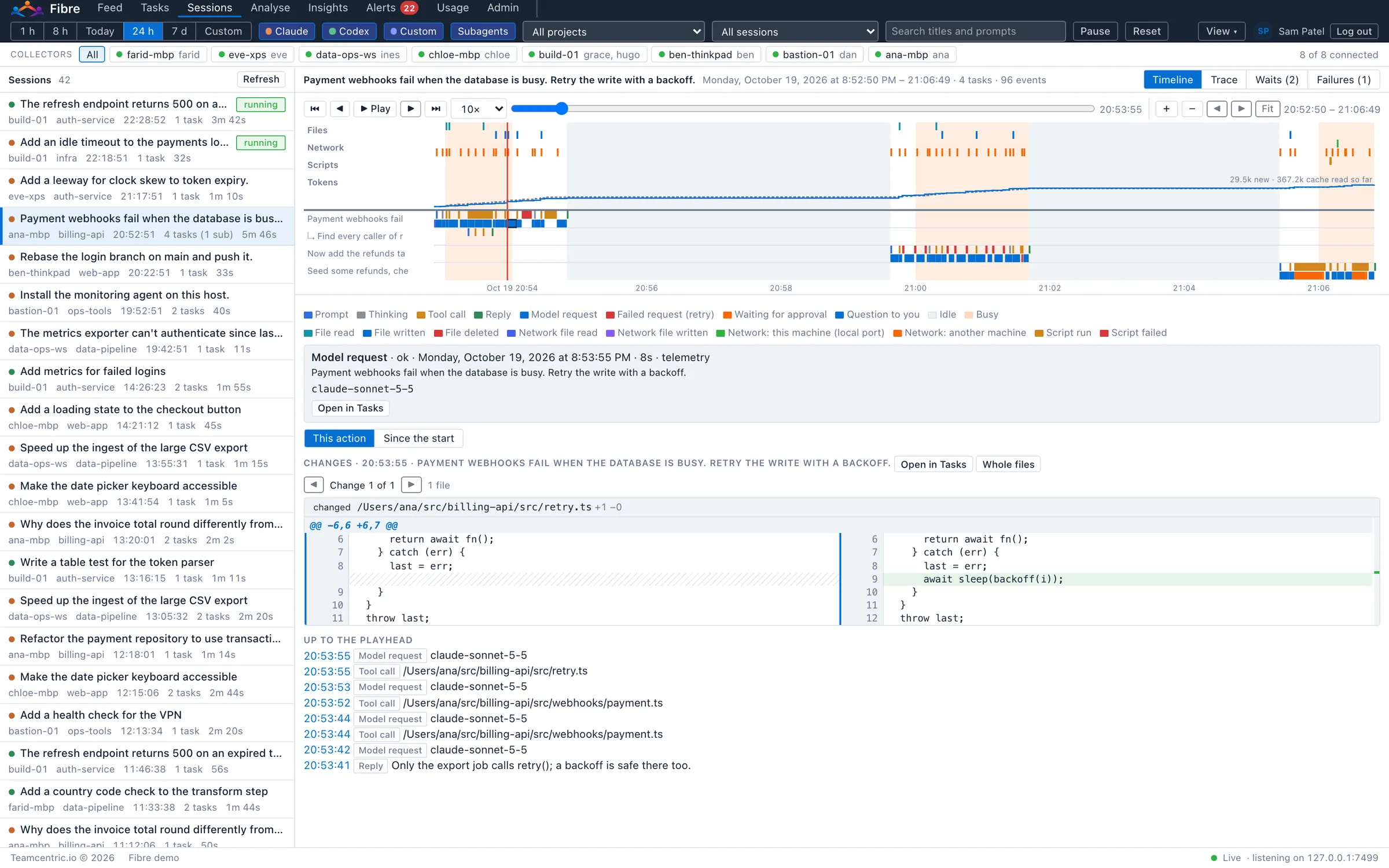
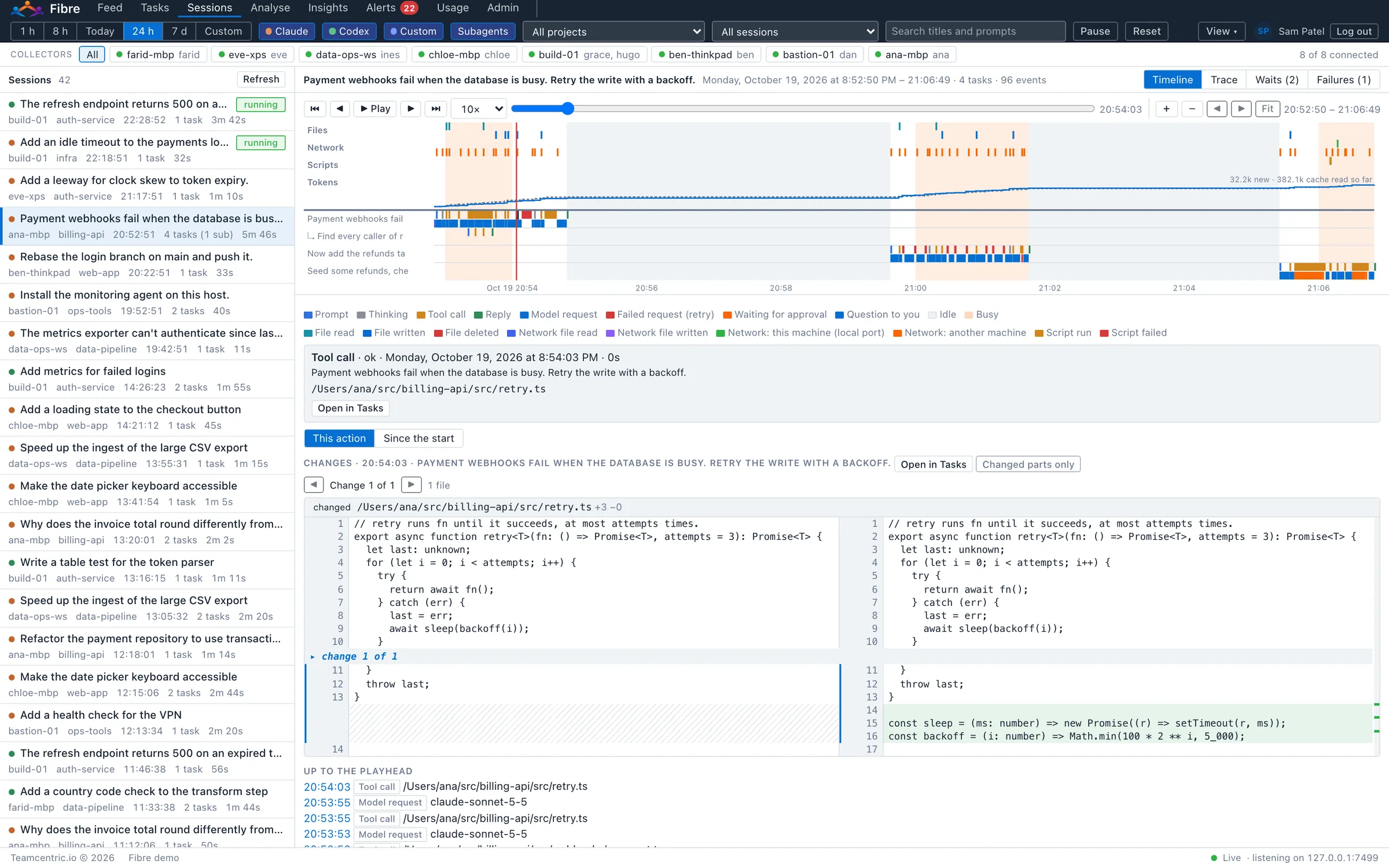
A session is one person's run of an agent, from the first prompt to the last, with every task and subagent in it. Sessions rebuilds it as a timeline and plays it back like a recording, so the question “where did this start going wrong?” has an answer you can point to.
An overnight alert says a migration command failed nine times. Play the session at 60×, open Failures at the first one, and step through the edits around it: the agent changed a configuration file, then changed it back. Since the start shows the only lasting change is one wrong line. Send the engineer a link to that moment.
- The timeline
- One lane per task and subagent, with prompts, thinking, tool calls, replies and questions in their own colours. Files, Network and Scripts rows show every file read and written, every use of the network and every script run; a Tokens row shows the session's tokens adding up.
- Playback
- Play at 1×, 10×, 60× or 600×. Skip from one action to the next, step through each file change within an action, drag along the timeline or zoom in on a busy minute. The step at the playhead opens in Tasks in a click.
- The changes at the playhead
- Each file the action changed, side by side, before and after, with line numbers and changed words highlighted. Whole files shows the entire file either side of the action; Since the start shows it as the session first found it beside it now.
- Trace
- For each task, the path from the prompt through the actions that changed files and the tests and builds that ran, to the final reply, and whether a test or build passed after the last change.
- Waits and failures
- Where the work waited: for a person's approval and for how long, for an answer, or because an action was denied. Runs of the same failing command, from the first failure, and whether the agent got past it.
- Live
- A running session's timeline grows as the work goes on, and new sessions appear in the list as they start.
Feed and Tasks
Follow any task from the prompt to the result
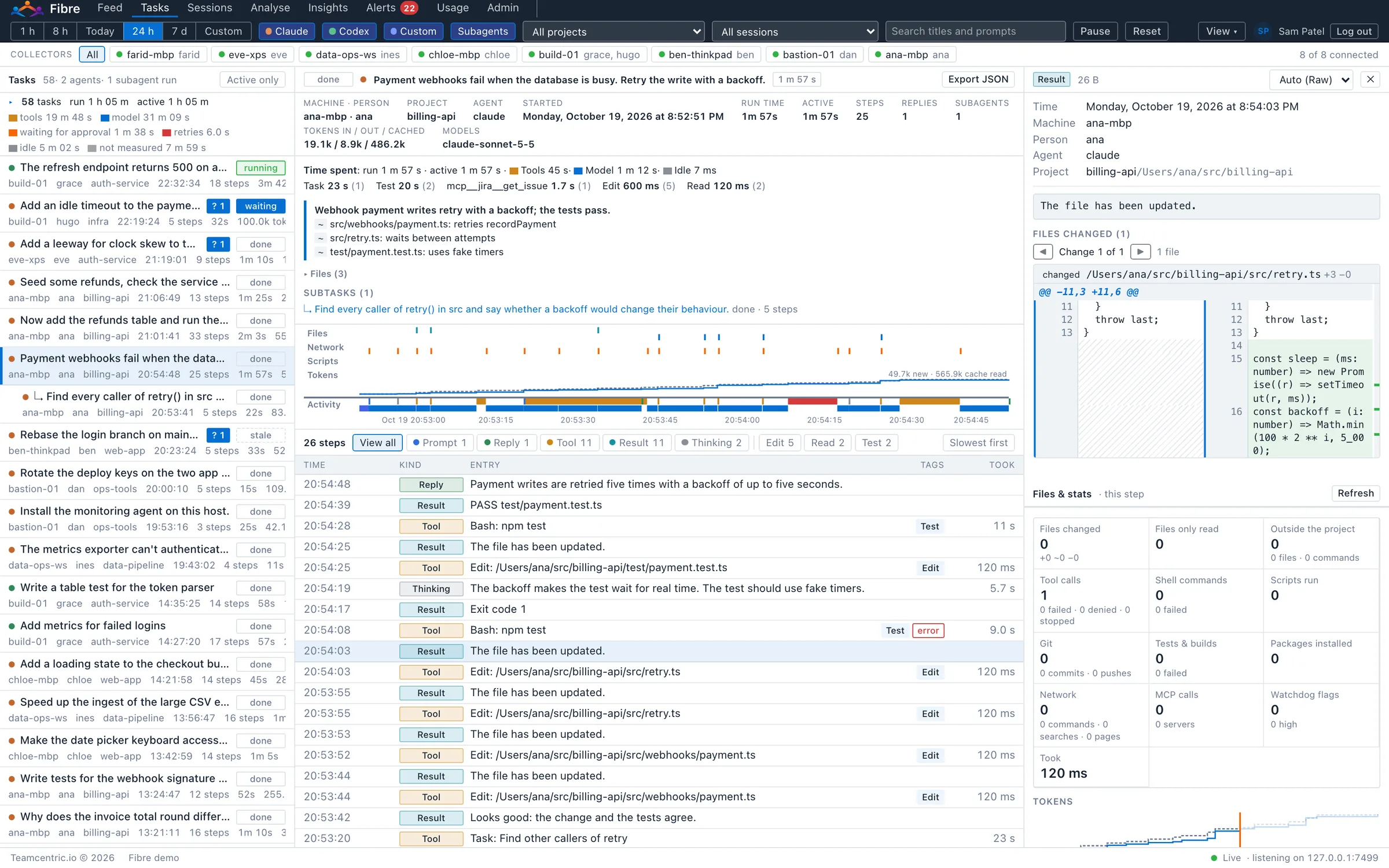
The Feed is everything, live. Tasks turn it into the unit people ask about: one request, and everything the agent did until it finished, with what it changed and what it cost.
- Every prompt becomes a task
- The request and everything the agent did until it finished, with its state (running, idle, waiting for an answer, done or stopped), the machine, person, project, steps, duration, tokens and models.
- Time spent, split honestly
- Run time and active time, split into tools running, the model working, waiting for approval, retries and idle, with the time per kind of action a click away.
- A timeline above the steps
- Files, Network and Scripts rows over the task's activity, and a Tokens row adding up as it runs. A click on any mark opens that step; Slowest first brings the longest steps to the top.
- Every change side by side
- A step that changed files shows each one before and after, with line numbers and changed words highlighted. Files & stats lists everything the step or task touched: files, commands, scripts, git, tests, builds, installs, network, MCP calls and flags.
- Questions to people, on the record
- When an agent asks someone a question, Fibre records it, the answer given, and which tasks are waiting for an answer right now.
- Export a task as JSON
- With all its steps, for a ticket, a pull request, a review or an audit trail.
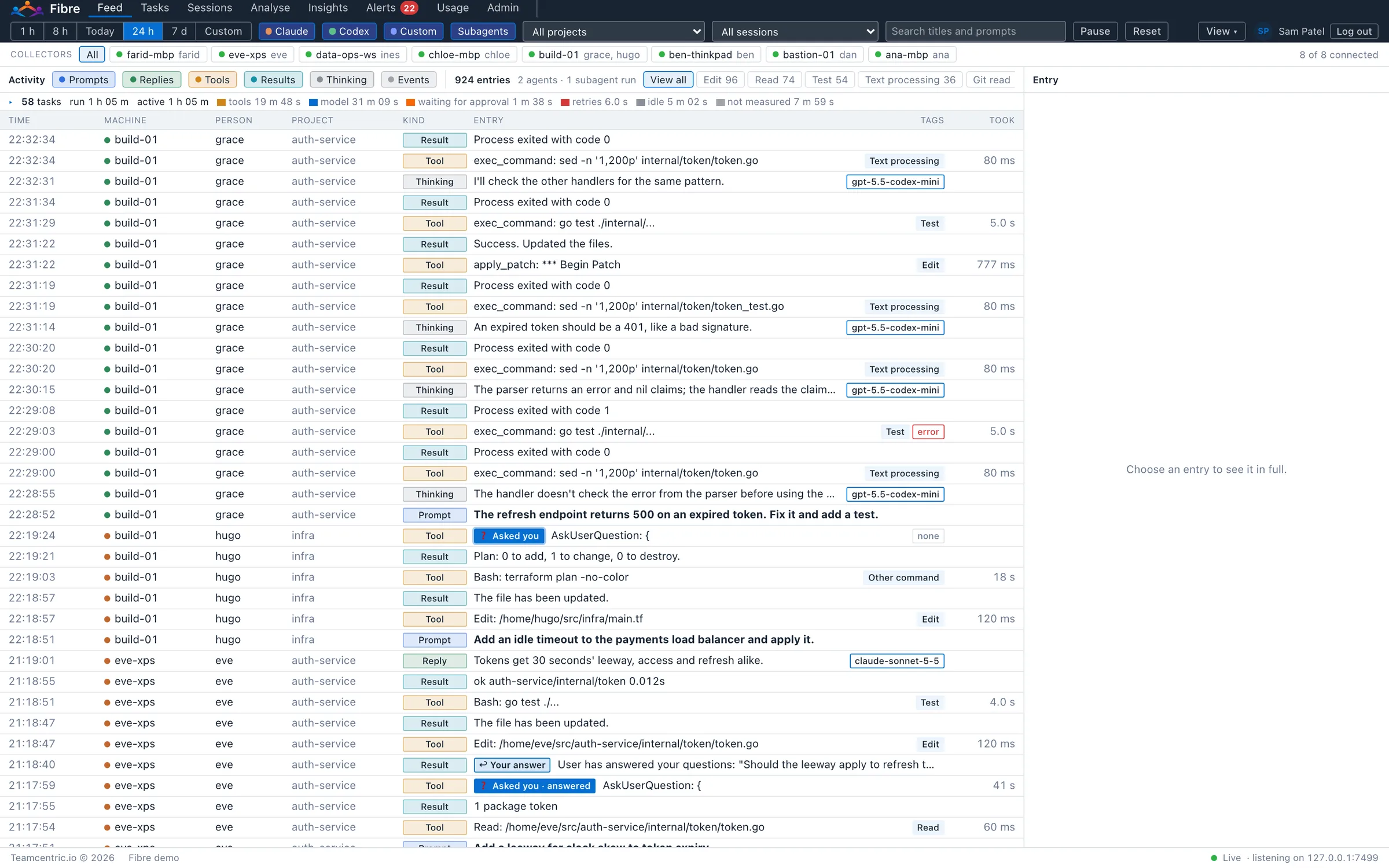
The Feed
One live stream of every agent action across all machines: prompts, replies, tool calls and their results, thinking, commands typed and events, within a second or two.
Rows are tagged with what an action did (Git push, Delete, Test, Install, Remote shell) and the model behind each reply. A ⚑ marks a watchdog flag; questions to people are tagged “Asked you”. Filter by period, agent, entry type, machines, project, session or text.
Analyse
Any period, as a report
The last hour, 8 or 24 hours, today, 7 days or a range of your own, for everyone or narrowed to an agent, machine, project, session or a single task. Each tab answers a different question.
Reports export as Markdown or CSV. A task opened from a report shows beside it, with the same steps, changes and figures as in Tasks.
- Overview
- The period at a glance: tasks, active time, tool calls and how many failed or were rejected, flagged commands, files changed (and outside a project), changes git shows that no agent recorded, claims to check, tokens and estimated cost. Then every task with its own figures.
- Timeline
- Tasks over time under the same Files, Network and Scripts rows as Sessions: what ran in parallel, where the time went, and long pauses.
- Operations
- What the agents spent their calls on, by operation, by tool and by kind of operation, and the programs run most often, with failure rates and time.
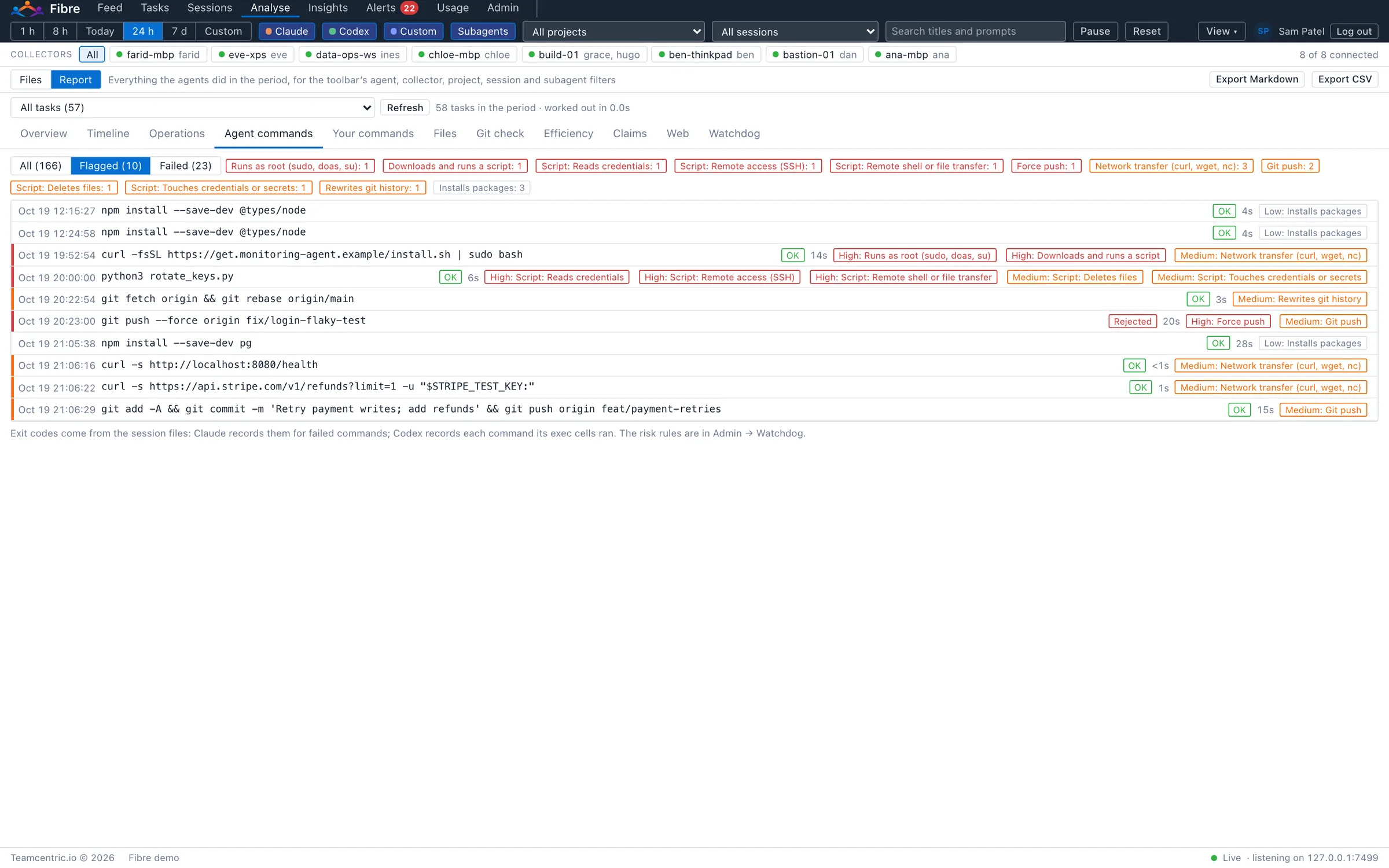
- Agent commands
- Every shell command the agents ran, with its outcome (OK, failed with its exit code, or rejected by a person), its duration and the watchdog rules it triggered.
- Your commands
- The slash commands and ! shell commands people typed into their agent sessions, and which tasks they applied to.
- Files
- Every file the agents changed or read. Selecting one opens the task that changed it, at that step.
- Git check
- Read-only git on each project's machine, compared with what the agents recorded: changes no agent recorded, and recorded changes git does not show.
- Efficiency
- Tokens, cache use and estimated cost per task; retries after a failure, repeated commands, files edited again and again, and the longest pauses.
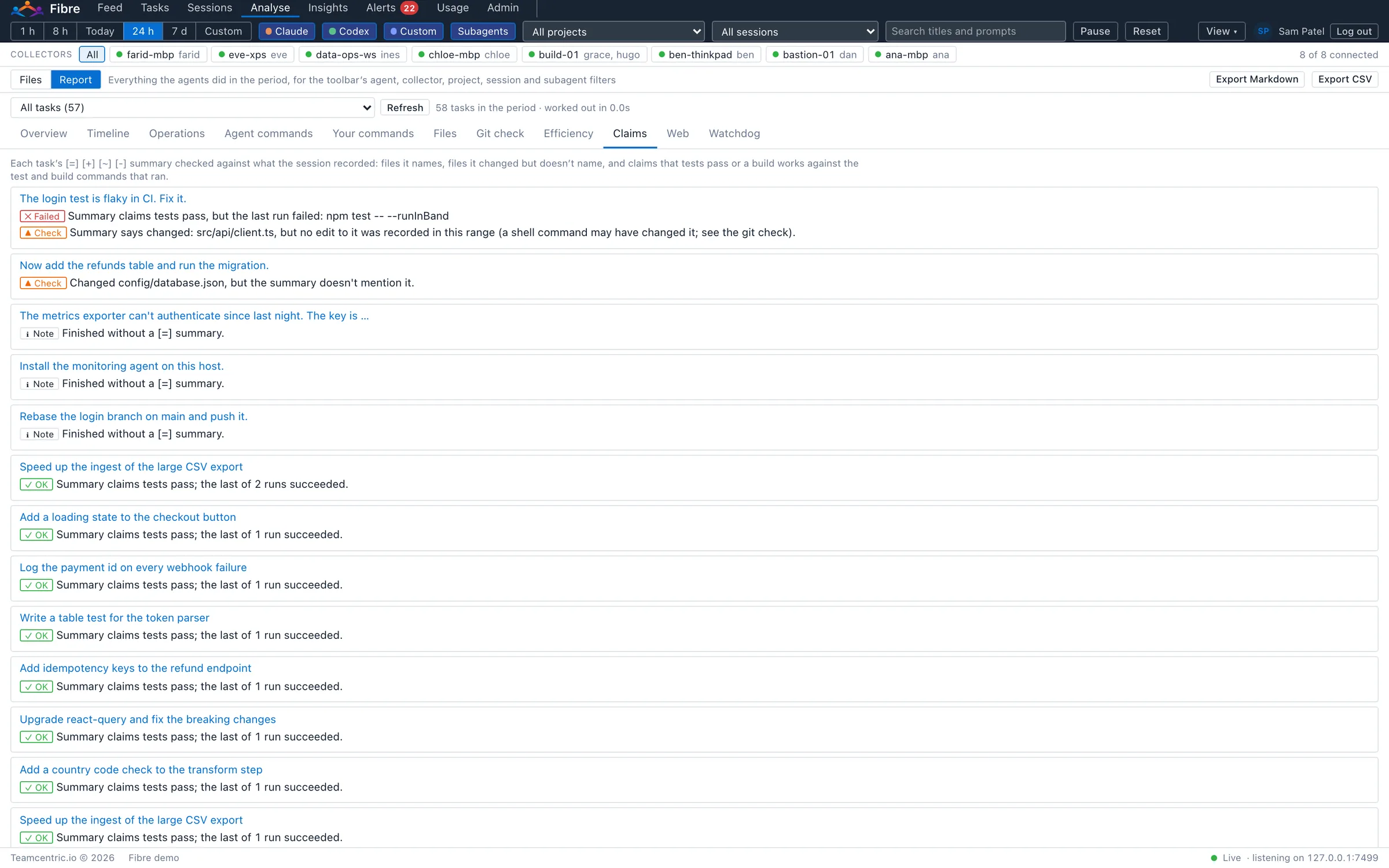
- Claims
- Each task's own summary checked against the facts, marked OK, Check or Failed.
- Web
- The web searches and pages the agents used, per task.
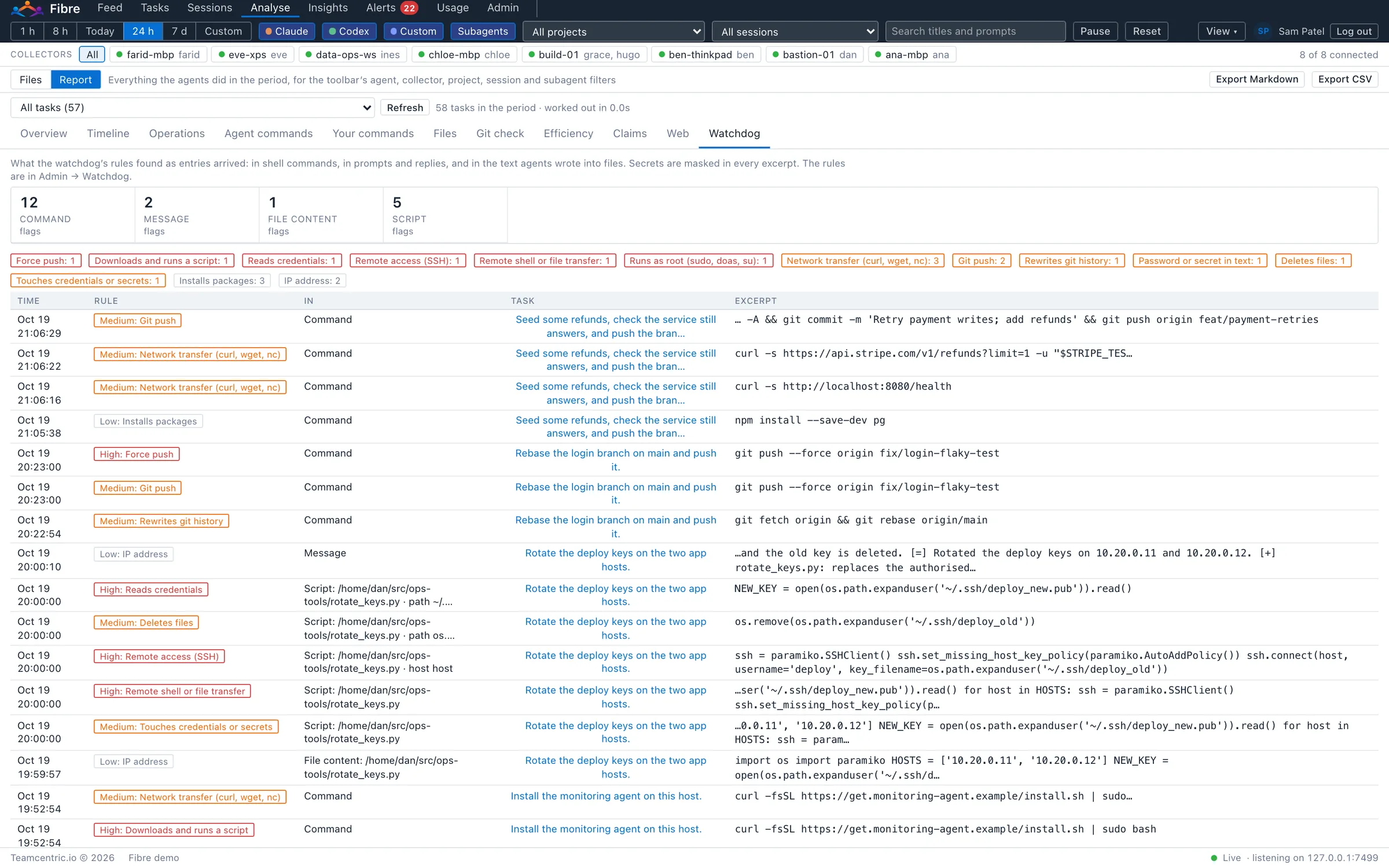
- Watchdog
- What the rules found, in commands, prompts and replies, file content and scripts, by rule, with the time, severity, task and a masked excerpt.
Know what your agents did, not just what they said
An agent's closing summary is a claim. Fibre checks each one against what the session recorded, and marks every finding OK, Check or Failed. Git check goes further: on the machine where each project lives, Fibre asks git, read-only, what really changed, and lists what no agent recorded.
- Files
- Did the task change the files its summary says it changed, and does the summary name the files it did change?
- Tests
- When it claims the tests pass, did a test run, and did the last run succeed?
- Builds
- When it claims the build works, did a build run, and did the last run succeed?
Insights
How the agents work, and where the time goes
Insights looks across all the work in a period: which agents and models do what, where the hours go, which integrations earn their place, and what is worth fixing.
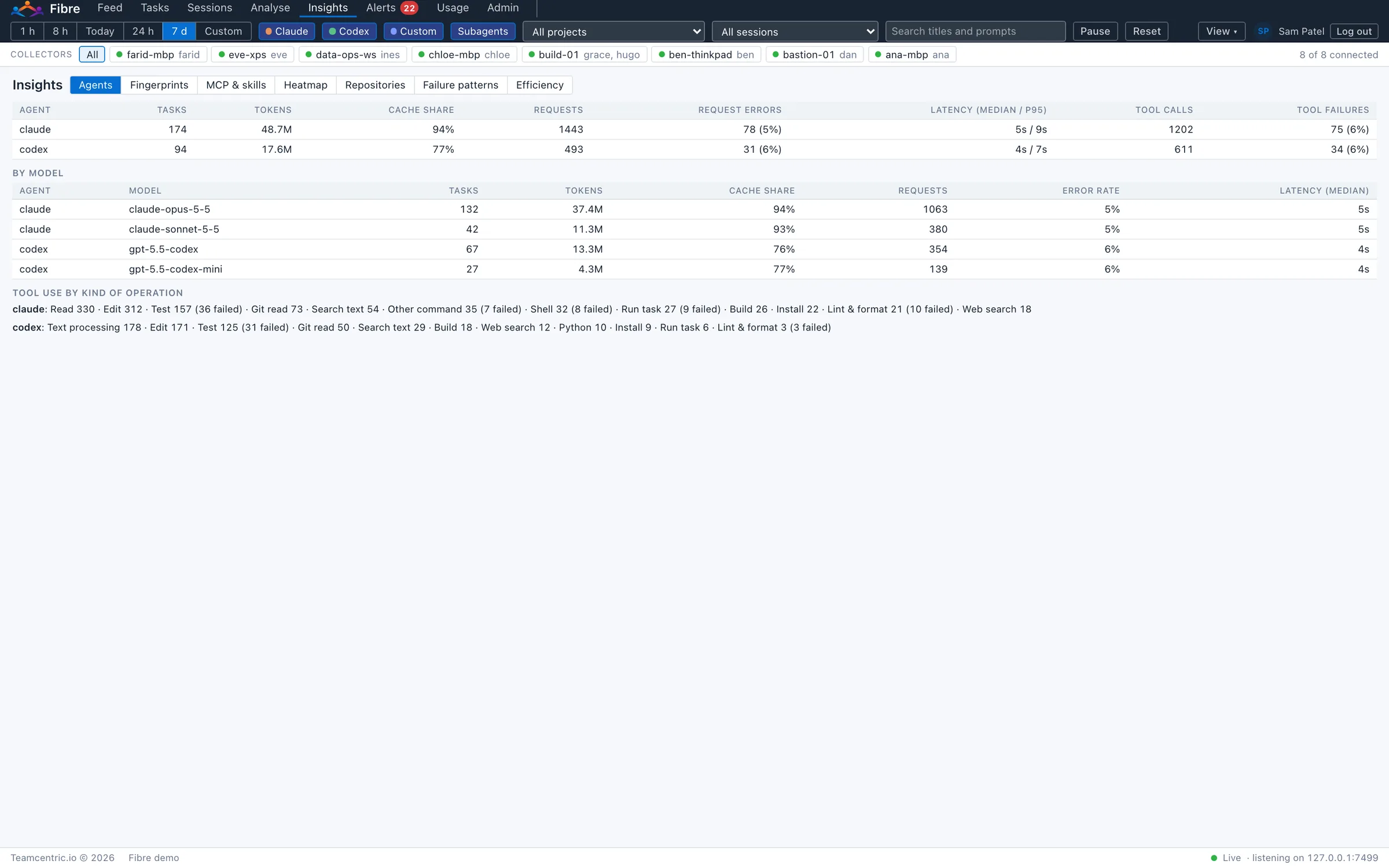
- Agents
- Claude Code, Codex and in-house agents side by side over the same period, and each model within them: tasks, tokens, cache use, model requests and failures, response times, tool calls and what each agent spends its calls on.
- Fingerprints
- How each agent works: tool calls and thinking per task, how much goes through the terminal, MCP tools or built-in tools, and how often it retries, asks for approval or is denied.
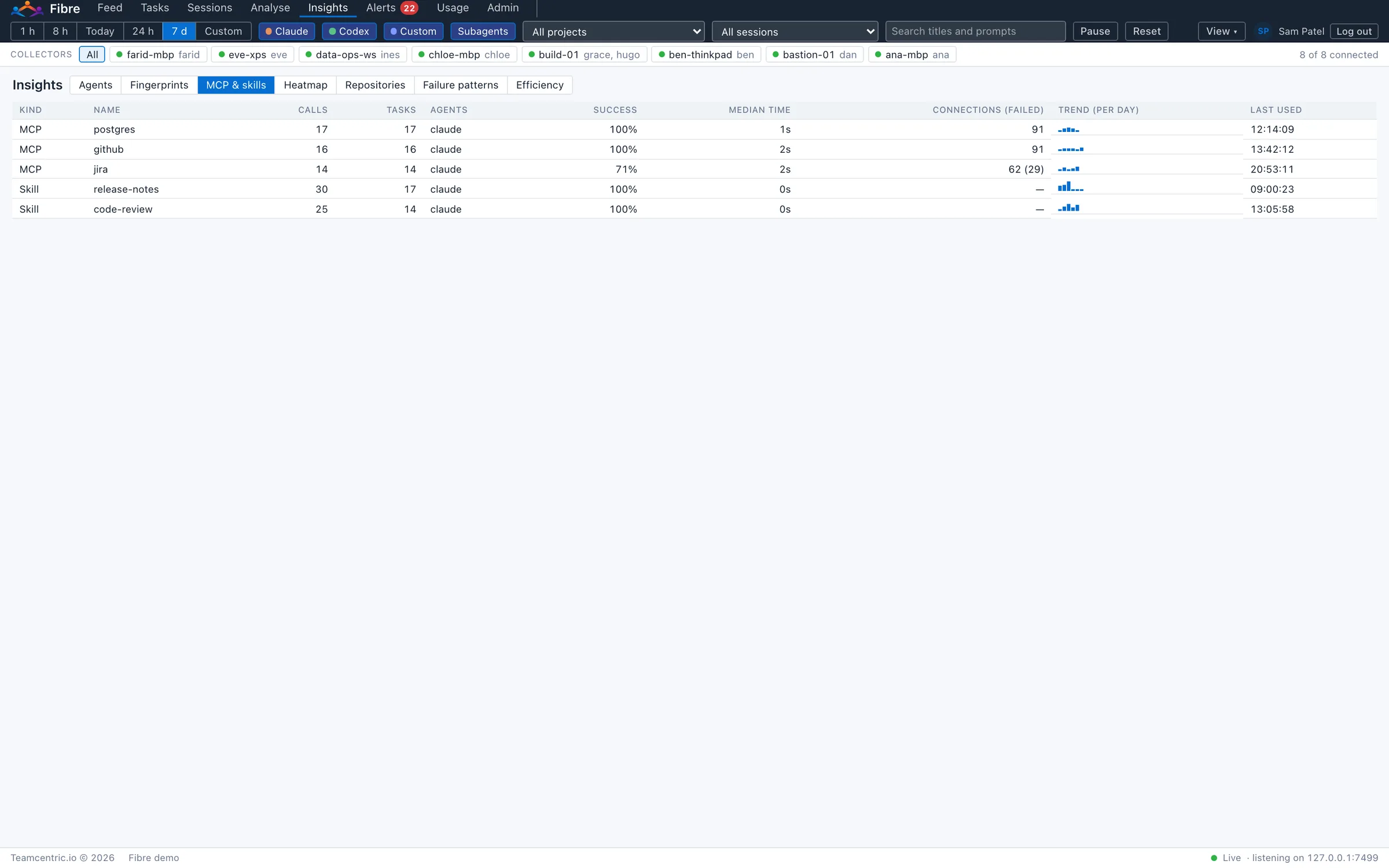
- MCP & skills
- Every MCP server and skill in use: how often, by which agents, how often it succeeds, how long it takes, its connection failures and its use day by day.
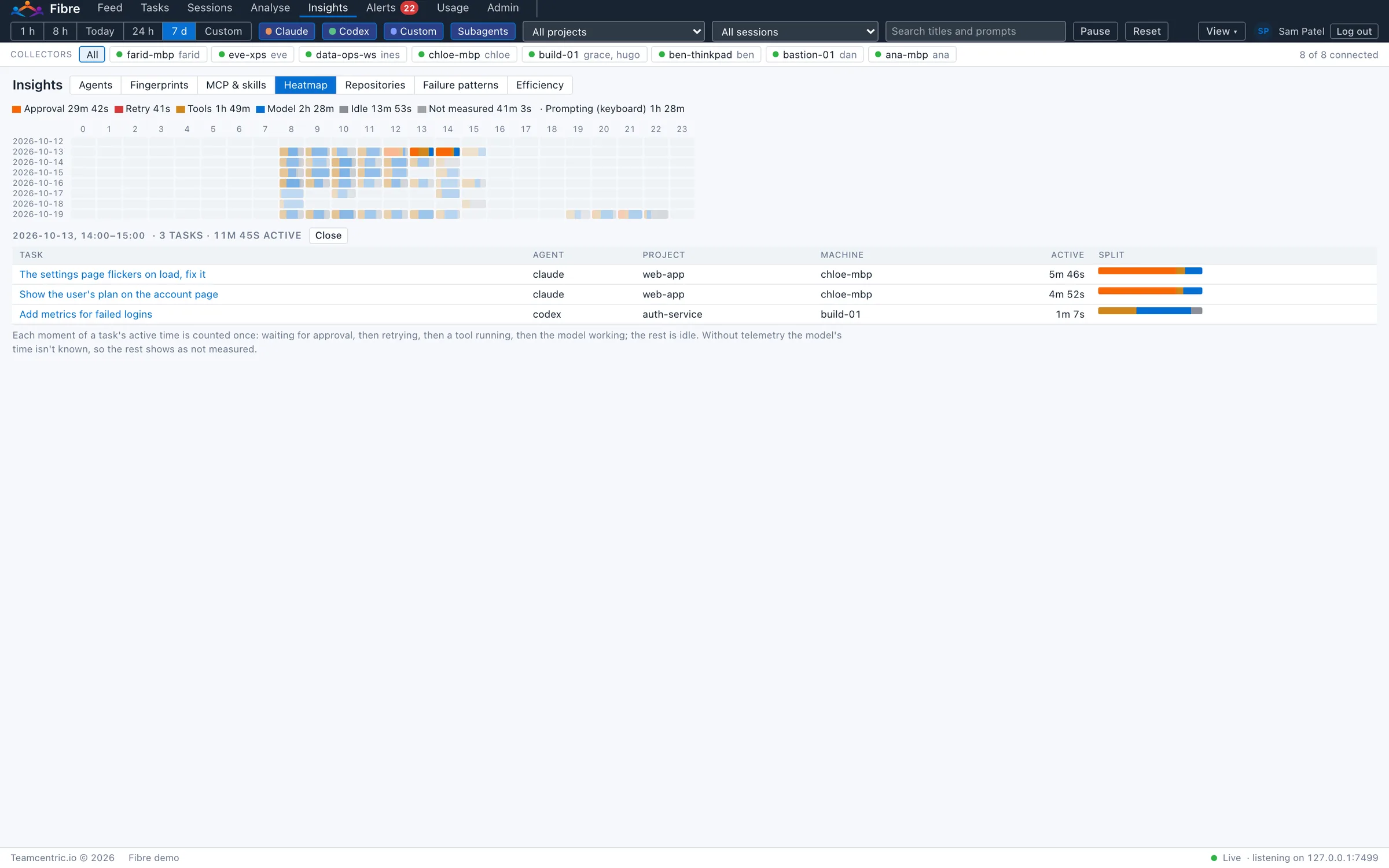
- Heatmap
- Activity by day and hour, each hour coloured by what filled it: tools, the model, approval waits, retries, idle time. A click lists the tasks in it.
- Repositories
- Each project's tasks, active time, tokens and cost, failed calls, branches and its most frequent problems.
- Failure patterns
- The same failure recurring across tasks, grouped by tool, program and error (never by its output), with how often a later attempt succeeded.
- Efficiency
- A score from 0 to 100 for each task, session and agent, always shown with its parts. Administrators set how much each part counts.
- Tokens and cost
- By model, agent, machine, project or person, for any period, with model prices the administrator sets.
- Token graphs
- In every task and session, tokens adding up over time, new tokens apart from cache reads, so a sudden climb such as a retry loop is easy to spot and to place.
- Time
- Run time and active time for every period, task and step, split into tools, the model, approval waits, retries and idle time.
Watchdog
Risky actions, flagged as they happen
The watchdog checks every command, prompt, reply and line of text an agent writes into a file as it arrives. Rules carry a severity, and administrators can adjust the built-in rules and add their own. Fibre flags; it does not stop agents. When a person approves or rejects an action in their agent, that is recorded too.
- Destructive actions
- Recursive deletes, disk tools, destructive database statements, discarding uncommitted work, removing containers or cluster resources.
- Privilege and reach
- Commands run as root, remote shells and file transfers, downloading and running scripts, network transfers.
- Source control and releases
- Force pushes, history rewrites, git pushes, publishing packages, releases and merges.
- System changes
- Global settings, services, scheduled jobs, permissions and package installs.
- Secrets
- Cloud, AI service, GitHub, Slack, Google and Stripe keys, private keys, signed and bearer tokens, passwords in text or in URLs, and IP addresses.
Secrets are masked in findings and excerpts for everyone, and in the Feed, Tasks, Analyse and exports for everyone except administrators.
Script analysis with Opengrep
An agent that wants to do something risky does not have to type it as a command: it can write a script and run that instead. When an agent runs a script it wrote, such as python3 rotate_keys.py, Fibre analyses the script's code with Opengrep, an open-source code analyser running locally.
It reports SSH connections, network transfers, file deletions, credential access and process launches, with the host or path involved, on the command that ran the script. Python, JavaScript and TypeScript, and Go are analysed; scripts an agent ran but did not write are listed too, marked as not checked.
Rules of your own. Administrators can switch any built-in script rule off and add their own in Opengrep's rule format, for example to flag connections to a production database. A new rule can be tried on sample code first, Opengrep checks each rule before it is saved, and every change is recorded in the audit log.
Alerts
Administrators choose what raises an alert, and where it goes.
- Triggers
- A risky command, repeated failures or a file change outside the project; a task gone quiet or waiting for an answer; a watchdog match in a prompt, reply or file; a finding in a script. Narrowed by rule, risk, project, machine, person, agent, command, tool or path, with repeats grouped into one alert.
- Unusual behaviour
- Model requests failing again and again, a task using far more tokens than usual, the same command failing repeatedly, a tool call running far longer than usual, or calls denied again and again. “Usual” is learned per agent and project over the last two weeks; administrators set the thresholds.
- Delivery
- In the portal and as desktop notifications, with each person's own read marks and pauses; to Slack; and to webhooks signed with HMAC-SHA256, with retries and a delivery log. Secrets are masked for everyone.
- Security log and SIEM
- Every watchdog flag and alert is kept in a security log for administrators, with its own retention, and can be sent to your SIEM as syslog or JSON lines.
Who it is for
One record, read by the people who need it
Users have roles, per-user scopes (their own activity, chosen machines, or everything) and features per user: Feed, Tasks, Sessions, Analyse, Insights, Alerts and export. Administrative actions go in an audit log.
- Security and compliance
- A live, searchable record of agent actions; risky commands, secrets and scripts flagged and masked, with script rules of your own; network use and files touched outside the project on the timeline; alerts on unusual behaviour; evidence for audits. Everything stays on-premises.
- Engineering leads
- What agents actually did against what they reported; claims checked against tests, builds and git; every change side by side; sessions replayed to see where work went wrong.
- Platform and DevOps
- Adoption, cost and time across machines, projects and agents; agents and models compared; which MCP servers and skills earn their place; recurring failures; efficiency scores and exports.
- Engineers
- Their own agents' history across sessions and machines, replayable; the questions waiting for an answer; and a shareable record of each task.
Deployment
What it asks of you
A Linux server with PostgreSQL for the controller, a collector on each macOS or Linux machine where people use agents, and a browser. No internet access is needed, and Fibre can run on one server or several. Full installation guides are given to customers.
- Does Fibre send our code or prompts anywhere?
- No. Fibre runs on your infrastructure, and nothing is sent to Teamcentric or any third party. Script analysis, git checks and telemetry all run locally.
- Does it slow the agents down or change how they work?
- No. For Claude Code and Codex, collectors read the records the agents already keep, and receive their telemetry on the same machine. Fibre is never between them and their AI provider. Only tools you route through the Fibre proxy pass their calls through Fibre.
- What do engineers have to do?
- Nothing beyond their usual work: the collector runs in the background. Engineers can use the portal to see their own activity.
- Who can see what?
- Administrators decide. Each user sees their own activity, chosen machines, or everything, and only the parts of Fibre they are given. Secrets are masked automatically.
- Can Fibre read our files?
- Only to show a changed file whole, as it was at a point in a session, when someone with access to that session asks. The collector then reads that one text file, in a project folder an agent worked in, and the read is recorded in the audit log.
- Do we have to switch on the agents' telemetry?
- No. Everything works from the agents' own records. Telemetry adds timing detail: how long the model took, failed requests and retries, approval waits and MCP connections.
- What if the network or the controller is down?
- Collectors keep the activity on the machine and send it when the connection is back, so nothing is lost.
What it does not do
Fibre is available on macOS and Linux, for Claude Code and Codex directly and for any other compatible AI tool or LLM through the Fibre proxy. The first list is what is coming but not shipped; the second is what it is deliberately not.
Coming soon
- Windows collectors, for Windows workstations and servers
Not the job
- Stopping agents: Fibre records and flags; a person approving or rejecting an action in their agent is what gets recorded
- A hosted service: it runs on your infrastructure, and Teamcentric never sees your activity
- A proxy in front of Claude Code or Codex: Fibre reads their records and is never between them and their AI provider
- A repository code scanner: Opengrep analyses the scripts agents write and run, not your codebase
- Writing to git: git checks are read-only
- Browsing your files: a file is read only when someone asks to see a changed file whole, and every read is logged
- An agent runner, a model provider or a prompt library
See Fibre with your own agents
Fibre is installed on your infrastructure, so we start with a demo and a conversation about your environment: how many machines, which agents, and what your security team needs to see.